Optuna: 一个超参数优化框架
Optuna 是一个特别为机器学习设计的自动超参数优化软件框架。它具有命令式的,define-by-run 风格的 API。由于这种 API 的存在,用 Optuna 编写的代码模块化程度很高,Optuna 的用户因此也可以动态地构造超参数的搜索空间。Optuna的文档和代码,也是设计清晰,工程质量上乘,有不少特性上的闪光点。
主要特点
Optuna 有如下现代化的功能:
- 轻量级、多功能和跨平台架构
- 并行的分布式优化
- 对不理想实验 (trial) 的剪枝 (pruning)
- 超参数重要性
- 集成新的 CMA-ES 采样
- 集成 MLflow
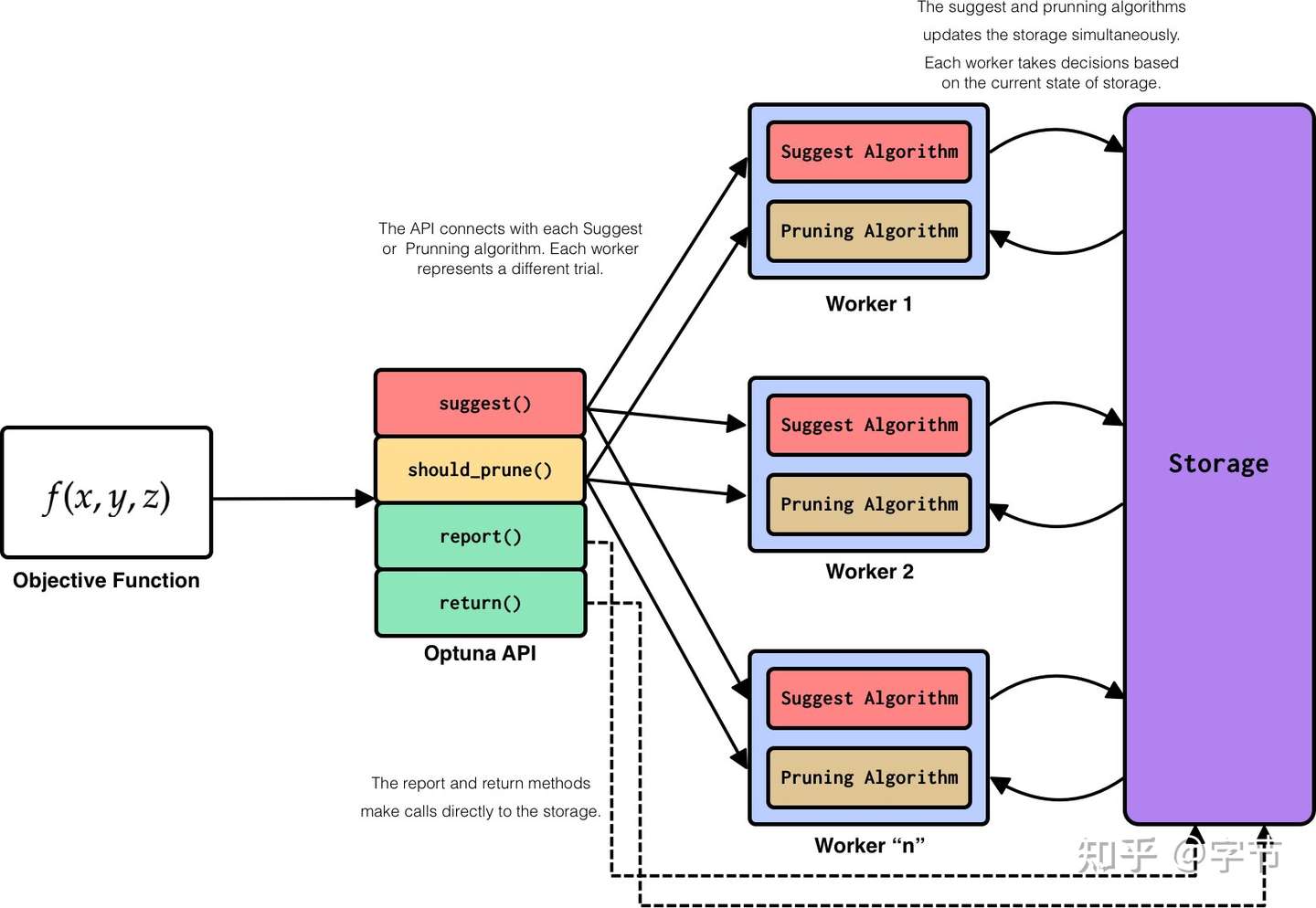
框架结合
Optuna 的框架结合做的非常好,第一次看到下面的 sample 代码时简直令我震惊:
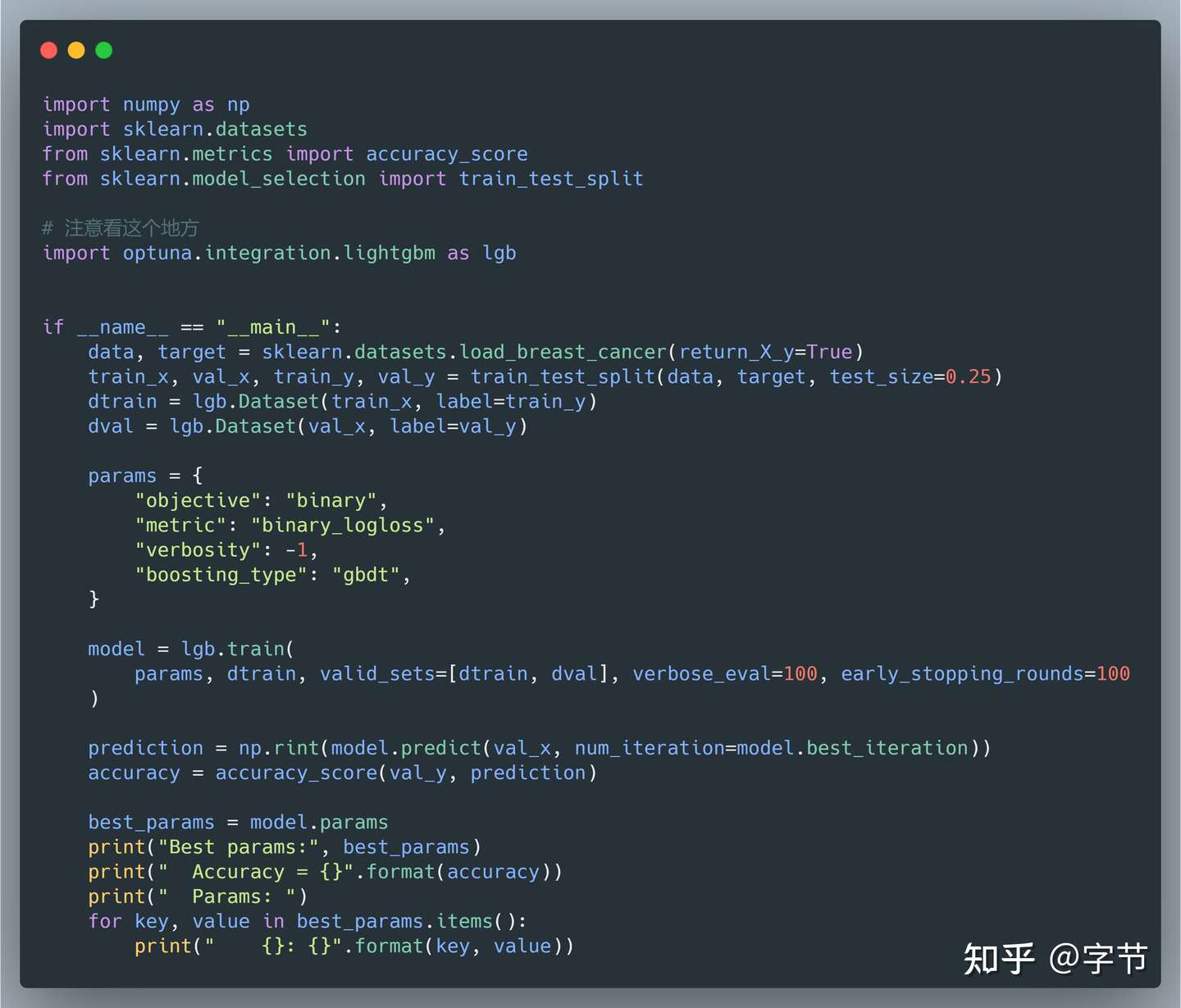
上面这串代码,如果不仔细看还以为就是在跑原生的 lightgbm,基本只改了一个 import,就成了一个自动搜参的 lightgbm!它背后会具体执行:
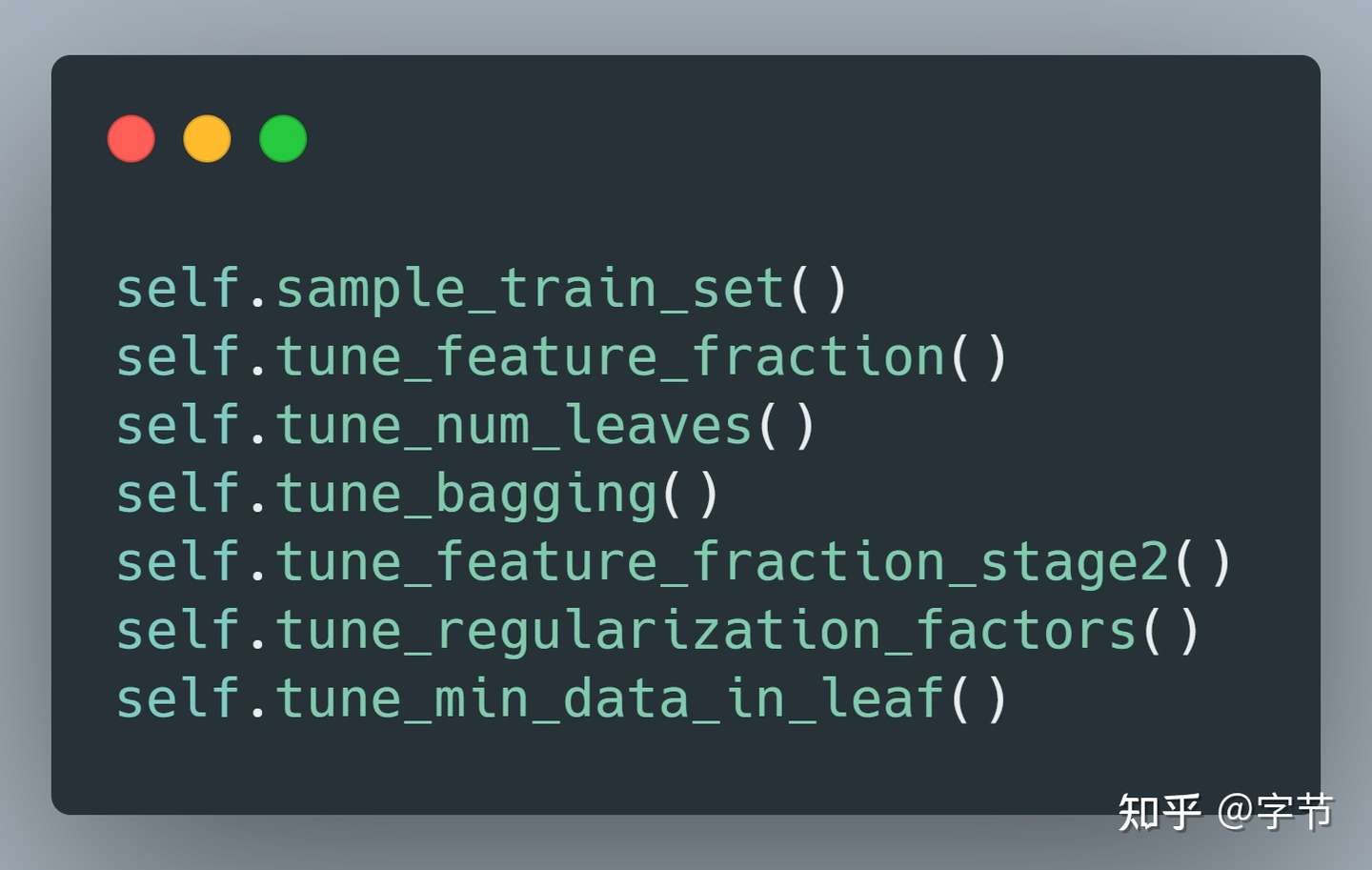
也是一个经验固化的调优 pipeline,不过事实上可以推广到各种不同模型的调优思路总结,比如 NN 应该先调学习率,batch size,再调网络结构,然后再精细化调整一下学习率等(欢迎有经验的同学 comment)。
高效搜参
虽然很多研究中都提到了 Successive Halving,Hyperband,Multi-fidelity 优化等提高搜索效率的手段,但真正在产品框架中做了很好实现的,Optuna 是我发现的第一家。只需要加个参数,就能实现在训练过程中提前终止那些看起来表现不好的参数组合,节省大量的搜参时间:
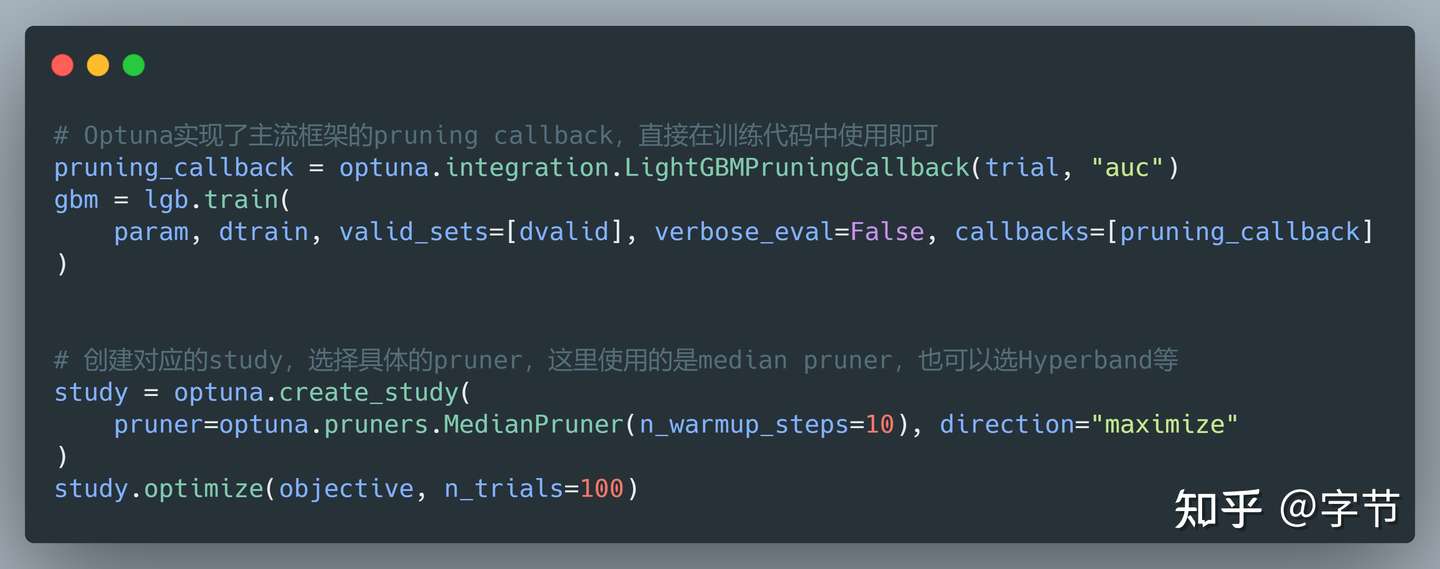
上面的搜参过程会在经过设定的 warm up 阶段后,针对每一组搜索的参数做定期的评估。比如训练 10 轮后,评估一下模型效果,如果发现比历史模型的表现中位值更差,就提前终止训练。
如果是自定义的模型,只要能支持增量训练(比如 NN 按照 epoch 来训练,树模型按照 boost round 来训练),就可以在训练过程中实现相应的 pruning 机制:
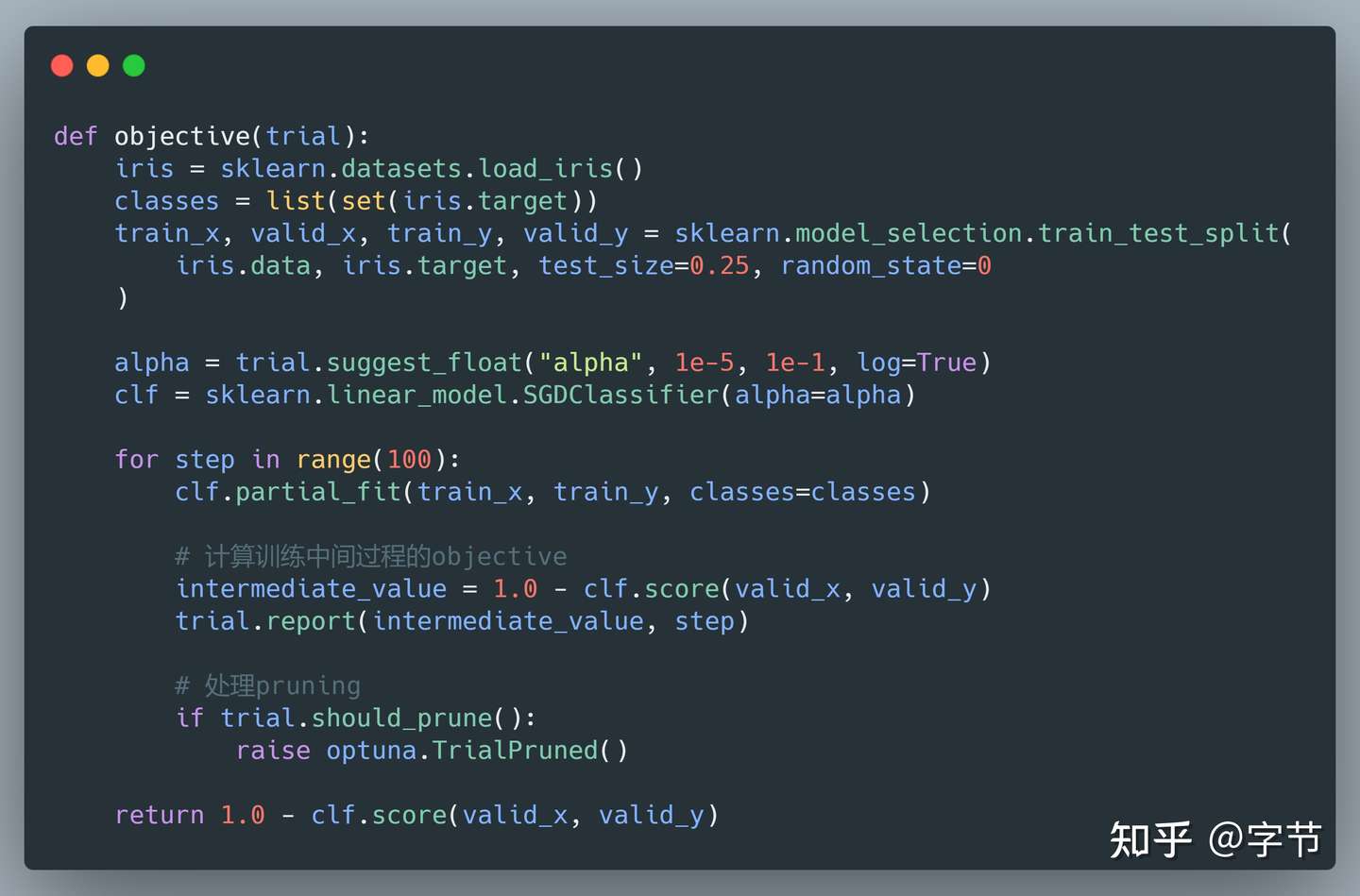
在实际使用过程中,使用 pruning 机制对于我们的搜索速度有成倍的效率提升,非常好用。
灵活的搜参空间定义
Optuna 还有一个很不一样的功能点在于动态定义搜索空间。例如我们在构建 NN 模型时,想动态决定一共构建多少层 MLP,以及每一层的神经元数量,如果用 hyperopt 之类的框架就不太容易实现。而用 Optuna,则可以直接用 Python 的循环,逻辑判断语句来生成:
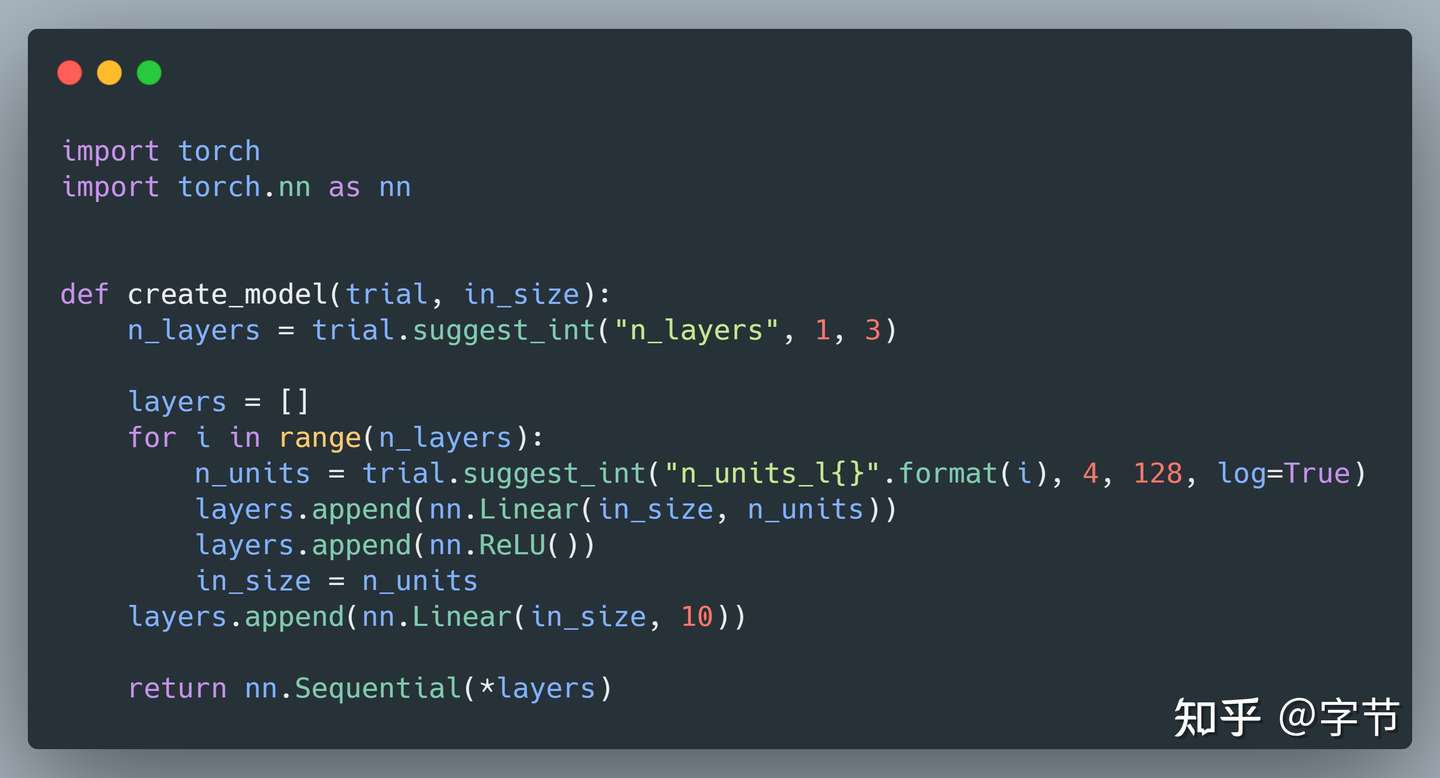
在这个基础上,我们甚至可以对整个 pipeline 的结构做灵活的搜索调整,比如看是否做数据的 categorical encoding,是否做 label transform,以及对应的用什么方法来转换等。
其它特性
Optuna 也支持分布式的优化执行,主要通过存储层(比如 MySQL db)来进行各个 trial 信息的记录和同步,实际执行中对于代码来说几乎没有什么“侵入性”。而对于资源管理,调度执行等方面的问题,都交给其它框架(例如 K8s,Ray)去解决,不失为一种相当简洁优雅的实现。当然缺点就是搜索上的调度,资源限制等就无法自行管理,比较简单的例子是如果你在一台 8 核机器上开 2 个使用 8 个 thread 训练的 lightgbm 的话,2 个任务都可能因为资源争抢而长时间无法完成。
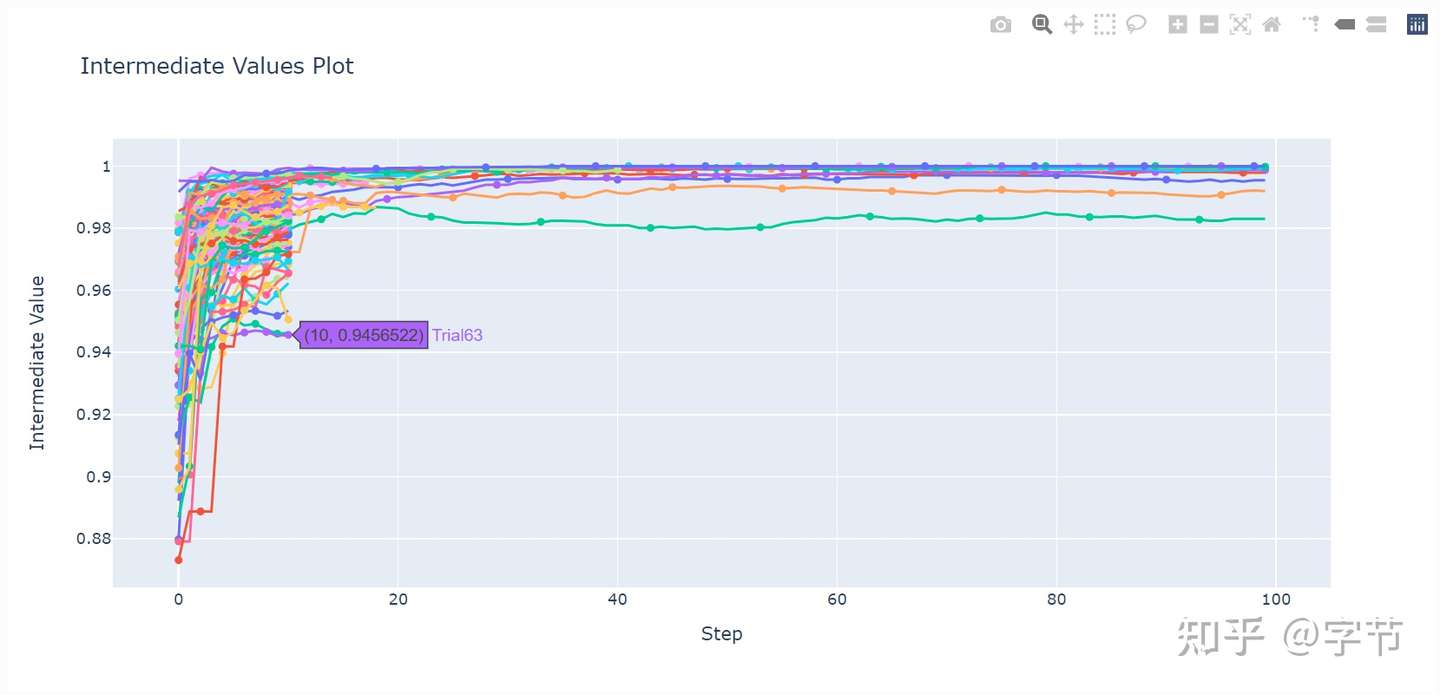
此外,Optuna 也开始引入了 dashboard 来展现优化过程的各类信息,便于用户来分析各个超参数对模型效果的影响等。
总结
Optuna 作为新世代的 autoML 工具,非常适合轻量级的模型参数优化与分析场景。其灵活的搜索空间定义,也很方便用户在此基础上来构建垂直场景的整体 pipeline 优化框架。
一句话点评:如果只想要一个快速灵活的调参工具,就选 Optuna。
超参数重要性
虽然 Optuna 的设计可以处理任意多的超参数,但通常情况下,我们建议保持尽量少的参数个数,以减少搜索空间的维度。因为实际上,在许多情况下,只有很少的参数在确定模型的整体性能中起主导作用。而从 2.0 版开始,我们 引入了一个新模块 optuna.importance. 该模块可以评估每个超参数对整体性能的重要性,optuna.importances.get_param_importances. 该函数接受一个 study 作为参数,返回一个字典,该字典将不同的超参数映射到其各自的重要性数值上,这个数值的浮动范围为 0.0 到 1.0, 值越高则越重要。同时,你也可以通过修改 evaluator 参数来尝试不同的超参数重要性评估算法,其中包括 fANOVA,这是一种基于随机森林的复杂算法。由于各种算法对重要性的评估方式不同,因此我们计划在以后的发行版中增加可选算法的数量。
study.optimize(...)
importances = optuna.importance.get_param_importances(study)

Specify which algorithm to use.

importances.optuna.importance.get_param_importances(
   study, evaluator=optuna.importance.FanovaImportanceEvaluator()
)你不用自己处理这些重要性数据,Optuna 已经提供了同 optuna.importance.get_param_importances 具有相同接口的函数 optuna.visualization.plot_param_importances。它将返回一个 Plotly 图表,这对于可视化分析很有帮助。
fig = optuna.visualization.plot_param_importances(study)
fig.show()下面是一幅使用 PyTorch 编写的神经网络绘制的重要性图。从中可以看出,学习率 “ lr” 占主导地位。
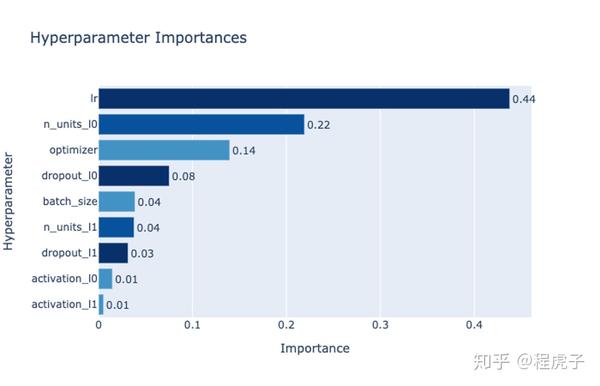 通过 mean decrease impurity 得出的超参数重要性。图中横柱的不同颜色是用于区分参数类型的,包括整数,浮点数和类别参数。
Hyperband Pruning
剪枝 (Pruning) 对于优化需要计算的目标函数至关重要。它使你可以在早期阶段有效地发现和停止无意义的试验,以节省计算资源,从而在更短的时间内找到最佳的优化方案。这也是在深度学习,这个Optuna的主要应用场景下我们经常碰到的情况。
比如,你可能需要训练由数百万个参数组成的神经网络,它们通常需要数小时或数天的处理时间。 Hyperband 是一种剪枝算法,它是建立在之前的逐次减半算法(SuccessiveHalvingPruner)基础上。逐次减半可以显着减少每次试验所需时间,但是众所周知,它对配置方式很敏感,而 Hyperband 解决了这个问题。该问题有很多种解决办法,而 Optuna 选择了启发式算法以进一步降低对用户的配置方式要求,使无相关技术背景的用户也能很容易使用。它最初在1.1版中作为实验性特性被引入,不过现在在接口和性能方面都已稳定。实验表明,在通用基准测试中,它的表现远强于其他的 pruner, 包括中位数 pruner (MedianPruner) ( Optuna 中的默认 pruner)。这一点你可以从下文的基准测试结果中看出。
study = optuna.create_study(
  pruner=optuna.pruners.HyperbandPruner(max_resource=”auto”)
)
study.optimize(...)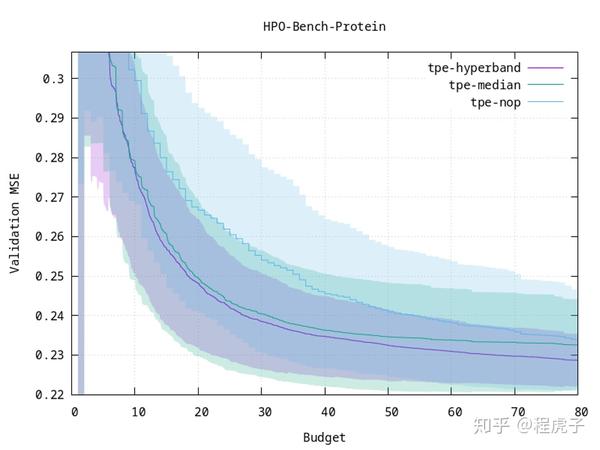 比起之前的包括中位数 pruner (
tpe-median) 在内的 pruner,Hyperband (tpe-hyperband) 不仅收敛更快,而且在多次运行中更稳定(见阴影区域的variance)。图中 1 budget 对应 100 个 training epochs. tpe-nop 代表无剪枝。
新的 CMA-ES 采样
optuna.samplers.CmaEsSampler 是新的CMA-ES采样器。 它比以前的 optuna.integration 子模块下的 CMA-ES 采样器要快。 这种新的采样器可以处理大量的试验,因此应适用于更广泛的问题。 此外,尽管以前的CMA-ES采样器过去一直不考虑被剪枝试验的优化,但该采样器还具有实验功能,可以在优化过程中更有效地利用修剪试验获得的信息。
过去你可能这么创建一个 study:
study = optuna.create_study(sampler=optuna.integration.CmaEsSampler())现在你可以用新的子模块来这么做了:
study = optuna.create_study(sampler=optuna.samplers.CmaEsSampler())或者,如果你要用原来的模块的话,它现在改了个名字:
study = optuna.create_study(sampler=optuna.integration.PyCmaSampler())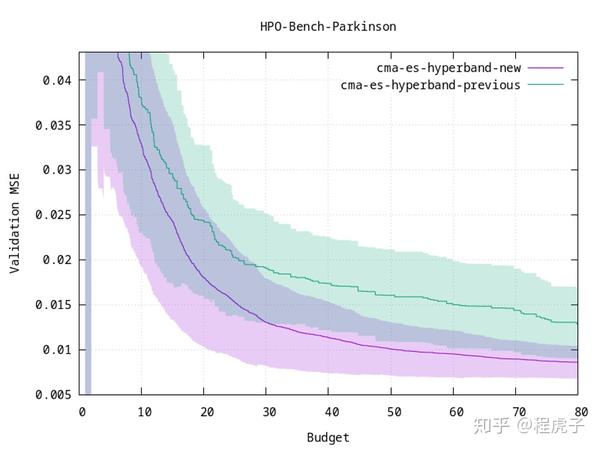 在优化过程中考虑被剪枝的试验的情况下,新的 CMA-ES 收敛速度更快。
与第三方框架的集成 (Integration)
Optuna带有各种子模块,可与各种第三方框架集成。 其中包括 LightGBM 和 XGBoost 等梯度增强框架,各种 PyTorch 和 TensorFlow 生态系统内的深度学习框架,以及许多其他框架。 在下文中,我们将介绍其中最重要的一些与此版本紧密相关的集成。
LightGBM
LightGBM是一个完善的、用于梯度增强的 Python 框架。 Optuna 提供了各种与 LightGBM 紧密集成的集成模块。 其中,“optuna.integration.lightgbm.train” 提供了对超参数的高效逐步调整,可用于直接取代 “ lightgbm.train”,因而用户无需修改代码。
而为了与其他Optuna组件进行交叉验证和集成,例如记录优化历史记录和分布式部署的研究,Optuna还提供了optuna.integration.lightgbm.LightGBMTuner和`optuna.integration.lightgbm.LightGBMTunerCV
MLflow
MLflow 是一个流行的、用于管理机器学习流水线和生命周期的框架。 而 MLflow Tracking 是一个通过交互式 GUI 监视实验的特别有用的工具。而现在,由于 MLflowCallback 的存在,使用 MLflow Tracking 来跟踪 Optuna 中的 HPO 实验变得非常简单,只要向 Optuna 的优化过程中注册一个回调函数即可。
Redis
优化算法和优化历史记录在 Optuna 的体系结构中是明确分开的。Storage 抽象了优化历史记录到各种后端(例如 RDB 或内存中)的储存过程。 RDB 可用于分布式优化或持久化保存历史记录,而内存中的存储则适用于不需要分布式优化或者持久记录的快速实验。 Redis 作为一种内存中的键-值存储,由于其灵活性和高性能而常被用于缓存。在本版本中,我们实验性地新增了一个 Redis 存储,在现有的 RDB 和内存存储之间建立了一个折中选项。 Redis 存储易于设置,可作为无法配置 RDS 的用户的备选项。
使用数据库存储搜索过程
Optuna 后端使用 SQL 存储实验记录,这种持久化的存储可以很方便我们访问研究历史记录。
New Study
我们可以通过调用create_study()函数来创建持久性的 study,如下所示。 SQLite文件example.db使用新的研究记录自动初始化。
import optuna
study_name = 'example-study'  # Unique identifier of the study.
study = optuna.create_study(study_name=study_name, storage='sqlite:///example.db')To run a study, call optimize() method passing an objective function.
def objective(trial):
    x = trial.suggest_uniform('x', -10, 10)
    return (x - 2) ** 2

study.optimize(objective, n_trials=3)Resume Study
To resume a study, instantiate a Study object passing the study name example-study and the DB URL sqlite:///example.db.
study = optuna.create_study(study_name='example-study', storage='sqlite:///example.db', load_if_exists=True)
study.optimize(objective, n_trials=3)Experimental History
We can access histories of studies and trials via the Study class. For example, we can get all trials of example-study as:
import optuna
study = optuna.create_study(study_name='example-study', storage='sqlite:///example.db', load_if_exists=True)
df = study.trials_dataframe(attrs=('number', 'value', 'params', 'state'))The method trials_dataframe() returns a pandas dataframe like:
print(df)Out:
   number       value  params_x     state
0       0   25.301959 -3.030105  COMPLETE
1       1    1.406223  0.814157  COMPLETE
2       2   44.010366 -4.634031  COMPLETE
3       3   55.872181  9.474770  COMPLETE
4       4  113.039223 -8.631991  COMPLETE
5 5 57.319570 9.570969 COMPLETEDistributed Optimization
First, create a shared study using optuna create-study command (or using optuna.create_study() in a Python script).
$ optuna create-study --study-name "distributed-example" --storage "sqlite:///example.db"

[I 2020-11-09 23:46:20,540] A new study created in RDB with name: di6:20,540] A new study created in RDB with name: distributed-exampleThen, write an optimization script. Let’s assume that foo.py contains the following code.
import optuna

def objective(trial):
    x = trial.suggest_uniform('x', -10, 10)
    return (x - 2) ** 2

if __name__ == '__main__':
    study = optuna.load_study(study_name='distributed-example', storage='sqlite:///example.db')
study.optimize(objective, n_trials=100)Finally, run the shared study from multiple processes. For example, run Process 1 in a terminal, and do Process 2 in another one. They get parameter suggestions based on shared trials’ history.
Process 1:
$ python foo.py
[I 2020-07-21 13:45:02,973] Trial 0 finished with value: 45.35553104173011 and parameters: {'x': 8.73465151598285}. Best is trial 0 with value: 45.35553104173011.
[I 2020-07-21 13:45:04,013] Trial 2 finished with value: 4.6002397305938905 and parameters: {'x': 4.144816945707463}. Best is trial 1 with value: 0.028194513284051464.
...Process 2 (the same command as process 1):
$ python foo.py
[I 2020-07-21 13:45:03,748] Trial 1 finished with value: 0.028194513284051464 and parameters: {'x': 1.8320877810162361}. Best is trial 1 with value: 0.028194513284051464.
[I 2020-07-21 13:45:05,783] Trial 3 finished with value: 24.45966755098074 and parameters: {'x': 6.945671597566982}. Best is trial 1 with value: 0.028194513284051464.
...Pruning Unpromising Trials
This feature automatically stops unpromising trials at the early stages of the training (a.k.a., automated early-stopping). Optuna provides interfaces to concisely implement the pruning mechanism in iterative training algorithms.
Activating Pruners
To turn on the pruning feature, you need to call report() and should_prune() after each step of the iterative training. report() periodically monitors the intermediate objective values. should_prune() decides termination of the trial that does not meet a predefined condition.
import sklearn.datasets
import sklearn.linear_model
import sklearn.model_selection

import optuna


def objective(trial):
    iris = sklearn.datasets.load_iris()
    classes = list(set(iris.target))
    train_x, valid_x, train_y, valid_y = \
        sklearn.model_selection.train_test_split(iris.data, iris.target, test_size=0.25, random_state=0)

    alpha = trial.suggest_loguniform('alpha', 1e-5, 1e-1)
    clf = sklearn.linear_model.SGDClassifier(alpha=alpha)

    for step in range(100):
        clf.partial_fit(train_x, train_y, classes=classes)

        # Report intermediate objective value.
        intermediate_value = 1.0 - clf.score(valid_x, valid_y)
        trial.report(intermediate_value, step)

        # Handle pruning based on the intermediate value.
        if trial.should_prune():
            raise optuna.TrialPruned()

return 1.0 - clf.score(valid_x, valid_y)Set up the median stopping rule as the pruning condition.
study = optuna.create_study(pruner=optuna.pruners.MedianPruner())
study.optimize(objective, n_trials=20)Executing the script above:
$ python prune.py
[I 2020-06-12 16:54:23,876] Trial 0 finished with value: 0.3157894736842105 and parameters: {'alpha': 0.00181467547181131}. Best is trial 0 with value: 0.3157894736842105.
[I 2020-06-12 16:54:23,981] Trial 1 finished with value: 0.07894736842105265 and parameters: {'alpha': 0.015378744419287613}. Best is trial 1 with value: 0.07894736842105265.
[I 2020-06-12 16:54:24,083] Trial 2 finished with value: 0.21052631578947367 and parameters: {'alpha': 0.04089428832878595}. Best is trial 1 with value: 0.07894736842105265.
[I 2020-06-12 16:54:24,185] Trial 3 finished with value: 0.052631578947368474 and parameters: {'alpha': 0.004018735937374473}. Best is trial 3 with value: 0.052631578947368474.
[I 2020-06-12 16:54:24,303] Trial 4 finished with value: 0.07894736842105265 and parameters: {'alpha': 2.805688697062864e-05}. Best is trial 3 with value: 0.052631578947368474.
[I 2020-06-12 16:54:24,315] Trial 5 pruned.
[I 2020-06-12 16:54:24,355] Trial 6 pruned.
[I 2020-06-12 16:54:24,511] Trial 7 finished with value: 0.052631578947368474 and parameters: {'alpha': 2.243775785299103e-05}. Best is trial 3 with value: 0.052631578947368474.
[I 2020-06-12 16:54:24,625] Trial 8 finished with value: 0.1842105263157895 and parameters: {'alpha': 0.007021209286214553}. Best is trial 3 with value: 0.052631578947368474.
[I 2020-06-12 16:54:24,629] Trial 9 pruned.
...Trial 5 pruned., etc. in the log messages means several trials were stopped before they finished all of the iterations.
Integration Modules for Pruning
To implement pruning mechanism in much simpler forms, Optuna provides integration modules for the following libraries.
For the complete list of Optuna’s integration modules, see integration.
For example, XGBoostPruningCallback introduces pruning without directly changing the logic of training iteration. (See also example for the entire script.)
pruning_callback = optuna.integration.XGBoostPruningCallback(trial, 'validation-error')
bst = xgb.train(param, dtrain, evals=[(dvalid, 'validation')], callbacks=[pruning_callback])User-Defined Sampler
Thanks to user-defined samplers, you can:
- experiment your own sampling algorithms,
- implement task-specific algorithms to refine the optimization performance, or
- wrap other optimization libraries to integrate them into Optuna pipelines (e.g.,
SkoptSampler).
This section describes the internal behavior of sampler classes and shows an example of implementing a user-defined sampler.
Overview of Sampler
A sampler has the responsibility to determine the parameter values to be evaluated in a trial. When a suggest API (e.g., suggest_uniform()) is called inside an objective function, the corresponding distribution object (e.g., UniformDistribution) is created internally. A sampler samples a parameter value from the distribution. The sampled value is returned to the caller of the suggest API and evaluated in the objective function.
To create a new sampler, you need to define a class that inherits BaseSampler. The base class has three abstract methods; infer_relative_search_space(), sample_relative(), and sample_independent().
As the method names imply, Optuna supports two types of sampling: one is relative sampling that can consider the correlation of the parameters in a trial, and the other is independent sampling that samples each parameter independently.
At the beginning of a trial, infer_relative_search_space() is called to provide the relative search space for the trial. Then, sample_relative() is invoked to sample relative parameters from the search space. During the execution of the objective function, sample_independent() is used to sample parameters that don’t belong to the relative search space.
An Example: Implementing SimulatedAnnealingSampler
For example, the following code defines a sampler based on Simulated Annealing (SA):
import numpy as np
import optuna


class SimulatedAnnealingSampler(optuna.samplers.BaseSampler):
    def __init__(self, temperature=100):
        self._rng = np.random.RandomState()
        self._temperature = temperature  # Current temperature.
        self._current_trial = None  # Current state.

    def sample_relative(self, study, trial, search_space):
        if search_space == {}:
            return {}

        #
        # An implementation of SA algorithm.
        #

        # Calculate transition probability.
        prev_trial = study.trials[-2]
        if self._current_trial is None or prev_trial.value <= self._current_trial.value:
            probability = 1.0
        else:
            probability = np.exp((self._current_trial.value - prev_trial.value) / self._temperature)
        self._temperature *= 0.9  # Decrease temperature.

        # Transit the current state if the previous result is accepted.
        if self._rng.uniform(0, 1) < probability:
            self._current_trial = prev_trial

        # Sample parameters from the neighborhood of the current point.
        #
        # The sampled parameters will be used during the next execution of
        # the objective function passed to the study.
        params = {}
        for param_name, param_distribution in search_space.items():
            if not isinstance(param_distribution, optuna.distributions.UniformDistribution):
                raise NotImplementedError('Only suggest_uniform() is supported')

            current_value = self._current_trial.params[param_name]
            width = (param_distribution.high - param_distribution.low) * 0.1
            neighbor_low = max(current_value - width, param_distribution.low)
            neighbor_high = min(current_value + width, param_distribution.high)
            params[param_name] = self._rng.uniform(neighbor_low, neighbor_high)

        return params

    #
    # The rest is boilerplate code and unrelated to SA algorithm.
    #
    def infer_relative_search_space(self, study, trial):
        return optuna.samplers.intersection_search_space(study)

    def sample_independent(self, study, trial, param_name, param_distribution):
        independent_sampler = optuna.samplers.RandomSampler()
return independent_sampler.sample_independent(study, trial, param_name, param_distribution)You can use SimulatedAnnealingSampler in the same way as built-in samplers as follows:
def objective(trial):
    x = trial.suggest_uniform('x', -10, 10)
    y = trial.suggest_uniform('y', -5, 5)
    return x**2 + y

sampler = SimulatedAnnealingSampler()
study = optuna.create_study(sampler=sampler)
study.optimize(objective, n_trials=100)In this optimization, the values of x and y parameters are sampled by using SimulatedAnnealingSampler.sample_relative method.
基本概念
简单介绍一下optuna里最重要的几个term。
在optuna里最重要的三个term:
(1)Trial:目标函数的单次执行过程
(2)Study:基于目标函数的优化过程, 一个优化超参的session,由一系列的trials组成;
(3)Parameter:需要优化的超参;
在optuna里,study对象用来管理对超参的优化,optuna.create_study()返回一个study对象。
study又有很多有用的 property:
(1)study.best_params:搜出来的最优超参;
(2)study.best_value:最优超参下,objective函数返回的值 (如最高的Acc,最低的Error rate等);
(3)study.best_trial:最优超参对应的trial,有一些时间、超参、trial编号等信息;
(4)study.optimize(objective, n_trials):对objective函数里定义的超参进行搜索;
optuna支持很多种搜索方式:
(1)trial.suggest_categorical('optimizer', ['MomentumSGD', 'Adam']):表示从SGD和adam里选一个使用;
(2)trial.suggest_int('num_layers', 1, 3):从1~3范围内的int里选;
(3)trial.suggest_uniform('dropout_rate', 0.0, 1.0):从0~1内的uniform分布里选;
(4)trial.suggest_loguniform('learning_rate', 1e-5, 1e-2):从1e-5~1e-2的log uniform分布里选;
(5)trial.suggest_discrete_uniform('drop_path_rate', 0.0, 1.0, 0.1):从0~1且step为0.1的离散uniform分布里选;
请参考下面的示例代码。一个 study 的目的是通过多次 trial (例如 n_trials=100 ) 来找出最佳的超参数值集(比如选择 classifier 还是 svm_c)。而 Optuna 旨在加速和自动化此类 study 优化过程。
import ...

# Define an objective function to be minimized.
def objective(trial):

    # Invoke suggest methods of a Trial object to generate hyperparameters.
    regressor_name = trial.suggest_categorical('classifier', ['SVR', 'RandomForest'])
    if regressor_name == 'SVR':
        svr_c = trial.suggest_loguniform('svr_c', 1e-10, 1e10)
        regressor_obj = sklearn.svm.SVR(C=svr_c)
    else:
        rf_max_depth = trial.suggest_int('rf_max_depth', 2, 32)
        regressor_obj = sklearn.ensemble.RandomForestRegressor(max_depth=rf_max_depth)

    X, y = sklearn.datasets.load_boston(return_X_y=True)
    X_train, X_val, y_train, y_val = sklearn.model_selection.train_test_split(X, y, random_state=0)

    regressor_obj.fit(X_train, y_train)
    y_pred = regressor_obj.predict(X_val)

    error = sklearn.metrics.mean_squared_error(y_val, y_pred)

    return error  # An objective value linked with the Trial object.

study = optuna.create_study()  # Create a new study.
study.optimize(objective, n_trials=100) # Invoke optimization of the objective function.PyTorch Example Code
扒一个官方给的PyTorch例子,链接在这:
import os

import torch
import torch.nn as nn
import torch.nn.functional as F
import torch.optim as optim
import torch.utils.data
from torchvision import datasets
from torchvision import transforms

import optuna

DEVICE = torch.device("cpu")
BATCHSIZE = 128
CLASSES = 10
DIR = os.getcwd()
EPOCHS = 10
LOG_INTERVAL = 10
N_TRAIN_EXAMPLES = BATCHSIZE * 30
N_VALID_EXAMPLES = BATCHSIZE * 10到目前为止是一些package的导入和参数的定义;
def define_model(trial):
    # We optimize the number of layers, hidden untis and dropout ratio in each layer.
    n_layers = trial.suggest_int("n_layers", 1, 3)
    layers = []

    in_features = 28 * 28
    for i in range(n_layers):
        out_features = trial.suggest_int("n_units_l{}".format(i), 4, 128)
        layers.append(nn.Linear(in_features, out_features))
        layers.append(nn.ReLU())
        p = trial.suggest_uniform("dropout_l{}".format(i), 0.2, 0.5)
        layers.append(nn.Dropout(p))

        in_features = out_features
    layers.append(nn.Linear(in_features, CLASSES))
    layers.append(nn.LogSoftmax(dim=1))

    return nn.Sequential(*layers)


def get_mnist():
    # Load MNIST dataset.
    train_loader = torch.utils.data.DataLoader(
        datasets.MNIST(DIR, train=True, download=True, transform=transforms.ToTensor()),
        batch_size=BATCHSIZE,
        shuffle=True,
    )
    valid_loader = torch.utils.data.DataLoader(
        datasets.MNIST(DIR, train=False, transform=transforms.ToTensor()),
        batch_size=BATCHSIZE,
        shuffle=True,
    )

return train_loader, valid_loader这一段代码里有个很有趣的用法,定义了一个函数define_model,里面用定义了一个需要优化的变量n_layers,用来搜索网络的层数,所以其实optuna还可以用来做NAS之类的工作,return成nn.Module就可以搜起来了;
def objective(trial):

    # Generate the model.
    model = define_model(trial).to(DEVICE)

    # Generate the optimizers.
    optimizer_name = trial.suggest_categorical("optimizer", ["Adam", "RMSprop", "SGD"])
    lr = trial.suggest_loguniform("lr", 1e-5, 1e-1)
    optimizer = getattr(optim, optimizer_name)(model.parameters(), lr=lr)

    # Get the MNIST dataset.
    train_loader, valid_loader = get_mnist()

    # Training of the model.
    model.train()
    for epoch in range(EPOCHS):
        for batch_idx, (data, target) in enumerate(train_loader):
            # Limiting training data for faster epochs.
            if batch_idx * BATCHSIZE >= N_TRAIN_EXAMPLES:
                break

            data, target = data.view(-1, 28 * 28).to(DEVICE), target.to(DEVICE)

            # Zeroing out gradient buffers.
            optimizer.zero_grad()
            # Performing a forward pass.
            output = model(data)
            # Computing negative Log Likelihood loss.
            loss = F.nll_loss(output, target)
            # Performing a backward pass.
            loss.backward()
            # Updating the weights.
            optimizer.step()

    # Validation of the model.
    model.eval()
    correct = 0
    with torch.no_grad():
        for batch_idx, (data, target) in enumerate(valid_loader):
            # Limiting validation data.
            if batch_idx * BATCHSIZE >= N_VALID_EXAMPLES:
                break
            data, target = data.view(-1, 28 * 28).to(DEVICE), target.to(DEVICE)
            output = model(data)
            pred = output.argmax(dim=1, keepdim=True)  # Get the index of the max log-probability.
            correct += pred.eq(target.view_as(pred)).sum().item()

    accuracy = correct / N_VALID_EXAMPLES
return accuracy这里是最重要的objective函数,首先定义了几个需要优化的parameter,「optimizer_name, lr和model里的n_layers和p」。剩下的就是一些常规的训练和测试代码,其中N_TRAIN_EXAMPLES和N_VAL_EXAMPLES是为了筛选出一小部分数据集用来搜索,毕竟用整个数据集来搜还是挺费劲的。
值得注意的是,objective函数返回的是accuracy,讲道理,搜索参数的目标是为了最大化该分类任务的accuracy,所以在创建study object的时候指定了direction为"maximize"。如果定义objective函数时返回的是类似error rate的值,则应该将direction指定为"minimize"。
if __name__ == "__main__":
    study = optuna.create_study(direction="maximize")
    study.optimize(objective, n_trials=100)

    print("Number of finished trials: ", len(study.trials))

    print("Best trial:")
    trial = study.best_trial

    print("  Value: ", trial.value)

    print("  Params: ")
    for key, value in trial.params.items():
print(" {}: {}".format(key, value))这里就是一些optuna的调用代码。
使用optuna的思路
1)sample个靠谱的子数据集;
2)写个objective函数的训练和测试代码,objective函数返回一个需要优化的metric;
3)把要优化的变量定义成optuna的parameter(通过trial.suggest_xxx);
4)copy个main部分代码,开始搜超参;