Ray 的核心概念
在传统的编程中,我们经常使用到2个核心概念:function 和 class。而在分布式系统中,我们希望可以分布式并行执行这些function和class。Ray使用装饰器@ray.remote来将function包装成Ray task,将class包装成Ray actor,包装过后的结果可以在远端并行执行。
Ray Task
Ray 允许在独立的 Python Woker上异步执行任意函数。这些异步 Ray 函数被称为“Task”。Ray 使Task能够根据 CPU、GPU 和自定义资源指定其资源需求。这些资源请求由集群调度器用于在集群中分配Task以实现并行执行。
要将Python函数f转换为“remote function”(可以远程和异步执行的函数),我们使用@ray.remote 装饰器声明该函数。然后通过f.remote()调用该函数,此远程调用返回一个Future(Future是Ray对最终输出的引用, 然后可以使用ray.get来获取它),实际的函数执行将在后台进行(我们称此执行为 Task)。
import ray
from typing import List

# Initialize Ray
ray.init()

@ray.remote
def square(x: int) -> int:
    """
    A remote function that computes the square of a given integer.

    Args:
        x (int): The input integer.

    Returns:
        int: The square of the input integer.
    """
    return x actor x

if __name__ == "__main__":
    """
    Main driver process that initializes workers and executes parallel computations.

    - Creates 4 worker processes that run remotely.
    - Uses `square.remote(i)` to execute `square(i)` remotely.
    - `ray.get(futures)` blocks execution until all computations are complete.
    - Finally, prints the computed results.
    # 创建4个worker进程,可以在远端并行执行。
    # 每执行1次f.remote(i),会发生以下事情:
    # - 创建1个worker进程,它将在远端执行函数f(i)
    # - 在driver进程上立刻返回一个引用(feature),该引用指向f(i)远程计算的结果
    """

    # Create a list of remote task futures
    futures: List[ray.ObjectRef] = [square.remote(i) for i in range(4)]

    # Wait for all remote tasks to complete and collect results
    # 阻塞/同步操作:等待4个worker进程全部计算完毕
    results: List[int] = ray.get(futures)  # Fixed syntax error (removed extra `)`)

    # Print final results after all computations are complete
    # 确保全部计算完毕后,在driver进程上print结果
print(f"The final result is: {results}") # Expected output: [0, 1, 4, 9]由于调用 f.remote(i) 立即返回,可以通过运行该行四次并行执行f的四个副本。
Specifying required resources
您可以在Task中指定资源需求 (see Specifying Task or Actor Resource Requirements for more details.)。
# Specify required resources.
@ray.remote(num_cpus=4, num_gpus=2)
def my_function():
    return 1

# Override the default resource requirements.
my_function.options(num_cpus=3).remote()Passing object refs to Ray tasks
除了值之外,对象引用 也可以传递到远程函数中。当Task执行时,在函数体内参数将是底层值。例如,这个函数:
@ray.remote
def function_with_an_argument(value):
    return value + 1


obj_ref1 = my_function.remote()
assert ray.get(obj_ref1) == 1

# You can pass an object ref as an argument to another Ray task.
obj_ref2 = function_with_an_argument.remote(obj_ref1)
assert ray.get(obj_ref2) == 2注意:
- 由于第二个Task依赖于第一个Task的输出,Ray 将不会执行第二个Task,直到第一个Task完成。
- 如果这两个Task被调度在不同的机器上,第一个Task的输出(对应于
obj_ref1/objRef1的值)将通过网络发送到第二个Task被调度的机器上。
Task Dependencies
Task也可以依赖于其他Task。下面,multiply_matrices task使用两个create_matrix task的输出,因此它将在前两个Task执行完毕后才开始执行。前两个Task的输出将自动作为参数传递给第三个Task,future将被替换为相应的值)。通过这种方式,Task可以组合在一起,具有任意DAG依赖性。
import ray
import numpy as np
from typing import Tuple

# Initialize Ray
ray.init()

@ray.remote
def create_matrix(size: Tuple[int, int]) -> np.ndarray:
    """
    Creates a matrix with normally distributed random values.

    Args:
        size (Tuple[int, int]): The shape of the matrix (rows, columns).

    Returns:
        np.ndarray: A matrix of given size with values drawn from a normal distribution.
    """
    return np.random.normal(size=size)

@ray.remote
def multiply_matrices(x: np.ndarray, y: np.ndarray) -> np.ndarray:
    """
    Multiplies two matrices using NumPy's dot product.

    Args:
        x (np.ndarray): The first matrix.
        y (np.ndarray): The second matrix.

    Returns:
        np.ndarray: The result of matrix multiplication (dot product).
    """
    return np.dot(x, y)

if __name__ == "__main__":
    """
    Main driver process to perform parallel matrix creation and multiplication using Ray.

    - Creates two large matrices remotely.
    - Multiplies them asynchronously using Ray remote functions.
    - Fetches and prints the result.
    """

    # Create two 1000x1000 matrices remotely
    x_id = create_matrix.remote((1000, 1000))
    y_id = create_matrix.remote((1000, 1000))

    # Perform matrix multiplication remotely
    z_id = multiply_matrices.remote(x_id, y_id)

    # Retrieve and print the final result
    z = ray.get(z_id)
print("Matrix multiplication completed. Result shape:", z.shape)Waiting for Partial Results
在 Ray Task 上调用 ray.get 会阻塞,直到Task完成执行。在启动多个Tasks 后,您可能想知道哪些Task已经完成执行,而不阻塞所有Task。这可以通过 ray.wait() 实现。该函数的工作原理如下。
object_refs = [slow_function.remote() for _ in range(2)]
# Return as soon as one of the tasks finished execution.
ready_refs, remaining_refs = ray.wait(object_refs, num_returns=1, timeout=None)Scheduling
对于每个Task,Ray 会选择一个节点来运行,调度决策基于几个因素,如 Task的资源需求、指定的调度策略 和 Task参数的位置。更多详情请参见 Ray 调度。
Fault Tolerance
默认情况下,Ray 会 重启 由于系统故障和指定的应用程序级故障而失败的Task。您可以通过在 ray.remote() 和 .options() 中设置 max_retries 和 retry_exceptions 选项来更改此行为。更多详情请参见 Ray 容错。
Task Events
默认情况下,Ray 跟踪 Task 的执行,报告 task 状态事件和分析事件,这些事件由 Ray 仪表板和 状态 API 使用。
你可以通过在 ray.remote() 和 .options() 中设置 enable_task_events 选项以禁用任务事件,这减少了任务执行的开销,以及任务发送到 Ray Dashboard 的数据量。嵌套任务不会从父任务继承任务事件设置。你需要分别为每个任务设置任务事件设置。
Ray Actor
Actor 将 Ray API 从函数(Task)扩展到类。Actor 本质上是一个有状态的worker(或服务)。当一个新的 Actor 被实例化时,会创建一个新的worker,并且 Actor 的方法会被调度到该特定worker上,并且可以访问和修改该worker的状态。与Task类似,Actor 支持 CPU、GPU 和自定义资源需求。
Ray允许您通过 @ray.remote 装饰器将Python类进行声明。每当类被实例化时,Ray会在集群中启动该类的远程实例,然后,此 Actor 可以执行远程方法调用并维护其自己的内部状态。这是一个运行进程并保存Actor对象的副本。对该Actor的方法调用变成在Actor进程上运行的Task,可以访问和修改Actor的状态。通过这种方式,Actors允许在多个Task之间共享可变状态,而远程函数则不允许。
各个Actors串行执行(每个单独的方法都是原子的),因此没有竞态条件。可以通过创建多个Actors来实现并行性。
import ray
from typing import Any

# Initialize Ray
ray.init()

@ray.remote
class Counter:
    """
    A Ray remote actor class representing a counter.

    This counter maintains an internal state `x`, which can be incremented
    and retrieved remotely using Ray actors.
    """

    def __init__(self) -> None:
        """Initialize the counter with a starting value of 0."""
        self.x: int = 0

    def inc(self) -> None:
        """Increment the counter by 1."""
        self.x += 1

    def get_value(self) -> int:
        """Retrieve the current value of the counter.

        Returns:
            int: The current counter value.
        """
        return self.x

# ===================================================================
# 创建driver进程,运行main
# ===================================================================
if __name__ == "__main__":
    # ===================================================================
    # 创建1个worker进程,具体做了以下事情:
    # - 在远端创建Counter实例
    # - 在driver端即刻返回对该实例的引用c(称为actor handler)
    # - 我们可以在Ray集群的任何节点上传递和使用这个actor handler。即在任何地方,
    #   我们可以通过c来invoke它对应Counter实例下的各种方法
    # ===================================================================
    """
    Main driver process that creates and interacts with a remote Counter actor.

    - Creates a Counter actor instance remotely.
    - Calls methods on the actor instance asynchronously.
    - Uses `ray.get()` to fetch results from remote method calls.
    """

    # Create a remote Counter actor instance
    c: Any = Counter.remote()

    # Retrieve and print the initial value of the counter
    print(ray.get(c.get_value.remote()))  # Expected output: 0

    # ===================================================================
    # 阻塞/同步:通过c来invoke远端Counter实例的get_value()方法,并确保方法执行完毕。
    # 执行完毕后才能接着执行driver进程上剩下的代码操作
    # ===================================================================
    # Increment the counter twice asynchronously
    c.inc.remote()
    c.inc.remote()

    # Retrieve and print the updated value of the counter
print(ray.get(c.get_value.remote())) # Expected output: 2上述示例是actors的最简单用法。Counter.remote()行创建了一个新的actor进程,该进程具有Counter对象的副本。对c.get_value.remote()和c.inc.remote()的调用在远程actor进程上执行Task并修改actor的状态。
Specifying required resources
你也可以在 actors 中指定资源需求(see Specifying Task or Actor Resource Requirements for more details.)
# Specify required resources for an actor.
@ray.remote(num_cpus=2, num_gpus=0.5)
class Actor:
passCalling the actor
我们可以通过使用 remote 操作符调用其方法与actor进行交互。然后,我们可以在对象引用上调用 get 来检索实际值。
# Call the actor.
obj_ref = counter.increment.remote()
print(ray.get(obj_ref))在不同actors上调用的方法可以并行执行,而在同一actor上调用的方法则按调用顺序串行执行。同一actor上的方法将共享状态,如下所示。
# Create ten Counter actors.
counters = [Counter.remote() for _ in range(10)]

# Increment each Counter once and get the results. These tasks all happen in
# parallel.
results = ray.get([c.increment.remote() for c in counters])
print(results)

# Increment the first Counter five times. These tasks are executed serially
# and share state.
results = ray.get([counters[0].increment.remote() for _ in range(5)])
print(results)Actor Handles
在上述示例中,我们仅从主Python脚本调用actor上的方法。actors最强大的方面之一是我们可以传递actor的句柄,这允许其他actors或其他Task都调用同一个actor上的方法。
以下示例创建了一个存储消息的actor。几个 Woker Task反复将消息推送到actor,主Python脚本定期读取消息。
import time
import ray
from typing import List


@ray.remote
class MessageActor:
    """
    A Ray remote actor class that stores and retrieves messages.

    The actor allows multiple workers to push messages asynchronously
    while enabling periodic retrieval and clearing of stored messages.
    """

    def __init__(self) -> None:
        """Initialize the message storage as an empty list."""
        self.messages: List[str] = []

    def add_message(self, message: str) -> None:
        """
        Adds a message to the internal storage.

        Args:
            message (str): The message to be added.
        """
        self.messages.append(message)

    def get_and_clear_messages(self) -> List[str]:
        """
        Retrieves all stored messages and clears the storage.

        Returns:
            List[str]: A list of messages retrieved before clearing.
        """
        messages = self.messages
        self.messages = []
        return messages


@ray.remote
def worker(message_actor: MessageActor, worker_id: int) -> None:
    """
    Worker function that continuously sends messages to the message actor.

    Args:
        message_actor (MessageActor): A reference to the remote MessageActor.
        worker_id (int): Unique identifier for the worker.
    """
    for i in range(100):
        time.sleep(1)  # Simulate some processing time
        message_actor.add_message.remote(f"Message {i} from worker {worker_id}.")


if __name__ == "__main__":
    """
    Main driver process:
    - Creates a MessageActor instance remotely.
    - Launches 3 workers that asynchronously send messages.
    - Periodically fetches and prints messages from the actor.
    """

    # Initialize Ray
    ray.init()

    # Create a remote message actor instance
    message_actor = MessageActor.remote()

    # Start 3 worker tasks that send messages to the actor
    workers = [worker.remote(message_actor, j) for j in range(3)]

    # Periodically fetch and print messages
    for _ in range(100):
        new_messages = ray.get(message_actor.get_and_clear_messages.remote())
        if new_messages:
            print("New messages:", new_messages)
        time.sleep(1)

# This script prints something like the following:
# New messages: []
# New messages: ['Message 0 from worker 1.', 'Message 0 from worker 0.']
# New messages: ['Message 0 from worker 2.', 'Message 1 from worker 1.', 'Message 1 from worker 0.', 'Message 1 from worker 2.']
# New messages: ['Message 2 from worker 1.', 'Message 2 from worker 0.', 'Message 2 from worker 2.']
# New messages: ['Message 3 from worker 2.', 'Message 3 from worker 1.', 'Message 3 from worker 0.']
# New messages: ['Message 4 from worker 2.', 'Message 4 from worker 0.', 'Message 4 from worker 1.']
# New messages: ['Message 5 from worker 2.', 'Message 5 from worker 0.', 'Message 5 from worker 1.']actors非常强大。它们允许您将Python类实例化为可以从其他actors和Task甚至其他应用程序查询的微服务。
Passing Around Actor Handles
Actor 句柄可以传递到其他Task中。我们可以定义使用actor句柄的远程函数(或actor方法)。
import time

@ray.remote
def f(counter):
    for _ in range(10):
        time.sleep(0.1)
counter.increment.remote()如果我们实例化一个actor,我们可以将句柄传递给各种Task。
counter = Counter.remote()

# Start some tasks that use the actor.
[f.remote(counter) for _ in range(3)]

# Print the counter value.
for _ in range(10):
    time.sleep(0.1)
print(ray.get(counter.get_counter.remote()))0
3
8
10
15
18
20
25
30
30Passing an Object
如上所示,Ray 将Task 和 Actor 的调用结果存储在其分布式对象存储中,并返回稍后可检索的对象引用。对象引用也可以通过ray.put显式创建,并且可以将对象引用传递给Tasks 作为参数值的替代:
import ray
import numpy as np
from typing import Union

# Initialize Ray
ray.init(ignore_reinit_error=True)


@ray.remote
def sum_matrix(matrix: Union[np.ndarray, ray.ObjectRef]) -> float:
    """
    Computes the sum of all elements in a given NumPy matrix.

    Args:
        matrix (Union[np.ndarray, ray.ObjectRef]): A NumPy matrix or a Ray object reference to a matrix.

    Returns:
        float: The sum of all elements in the matrix.
    """
    return np.sum(matrix)


if __name__ == "__main__":
    # Create a small matrix and compute its sum using Ray.
    small_matrix = np.ones((100, 100))  # 100x100 matrix of ones
    result_small = ray.get(sum_matrix.remote(small_matrix))
    print(f"Sum of small matrix: {result_small}")  # Expected output: 10000.0

    # Store a large matrix in the Ray object store.
    large_matrix = np.ones((1000, 1000))  # 1000x1000 matrix of ones
    matrix_ref = ray.put(large_matrix)  # Store in Ray object store

    # Compute the sum of the large matrix using Ray.
    result_large = ray.get(sum_matrix.remote(matrix_ref))
    print(f"Sum of large matrix: {result_large}")  # Expected output: 1000000.0

    # Shutdown Ray to release resources
ray.shutdown()Scheduling
对于每个actor,Ray 会选择一个节点来运行它,调度决策基于一些因素,如 actor的资源需求 和 指定的调度策略. 更多详情请参见 Ray scheduling .
Fault Tolerance
默认情况下,Ray actor不会被 重启 ,当 actor 意外崩溃时,actor task不会被重启。可以通过在 ray.remote() 和 .options() 中设置 max_restarts 和 max_task_retries 选项来改变这种行为。更多详情请参见 Ray 容错。
FAQ:Actor、Worker 和 Resources
1. worker 和 actor 之间有什么区别?
每个“Ray worker”是一个Python进程。
Workers在 Tasks 和 actors 中受到不同的对待。任何的 “Ray Workers”
- 用于执行多个 Ray Task,
- 作为专用 Ray actor启动。
Tasks:当 Ray 在一台机器上启动时,会自动启动多个 Ray 工作进程(默认情况下每个 CPU 一个)。它们将用于执行Tasks(类似于进程池)。如果你执行 8 个Tasks,每个Task使用
num_cpus=2,并且总 CPU 数为 16(ray.cluster_resources()["CPU"] == 16),你最终会有 8 个工作进程。Actor: Ray Actor 也是一个 “Ray Workers”,但在运行时实例化(通过
actor_cls.remote())。它的所有方法都将在同一进程中运行,使用相同的资源(在定义 Actor 时指定)。请注意,与Task不同,运行 Ray Actor 的 Python 进程不会被重用,当 Actor 被删除时,这些进程将被终止。
为了最大限度地利用资源,您希望最大化Worker的工作时间。您需要分配足够的集群资源,以便所有需要的 Actors 都能运行,并且您定义的任何其他Task也能运行。这也意味着Task的调度更加灵活,并且如果您不需要 Actors 的状态部分,您最好使用Task。
Actor 的 AsyncIO / 并发性
在一个单一的actor进程中,可以执行并发线程。
Ray 在 actor 中提供两种类型的并发:
请记住,Python 的 全局解释器锁 (GIL) 将只允许一个 Python 代码线程同时运行。
这意味着如果你只是并行化 Python 代码,你不会得到真正的并行性。如果你调用 Numpy、Cython、Tensorflow 或 PyTorch 代码,这些库在调用 C/C++ 函数时会释放 GIL。
无论是 线程化Actor 还是 异步Actor 模型,都无法让你绕过 GIL。
Actor 的 AsyncIO
自Python 3.5起,可以使用 async/await 语法 编写并发代码。Ray 原生集成了 asyncio。你可以将 ray 与流行的异步框架如 aiohttp、aioredis 等一起使用。
import ray
import asyncio

@ray.remote
class AsyncActor:
    # multiple invocation of this method can be running in
    # the event loop at the same time
    async def run_concurrent(self):
        print("started")
        await asyncio.sleep(2) # concurrent workload here
        print("finished")

actor = AsyncActor.remote()

# regular ray.get
ray.get([actor.run_concurrent.remote() for _ in range(4)])

# async ray.get
async def async_get():
    await actor.run_concurrent.remote()
asyncio.run(async_get())(AsyncActor pid=40293) started
(AsyncActor pid=40293) started
(AsyncActor pid=40293) started
(AsyncActor pid=40293) started
(AsyncActor pid=40293) finished
(AsyncActor pid=40293) finished
(AsyncActor pid=40293) finished
(AsyncActor pid=40293) finishedObjectRefs 作为 asyncio.Futures
ObjectRefs 可以转换为 asyncio.Futures。这一特性使得在现有的并发应用程序中可以 await ray futures。
而不是:
import ray

@ray.remote
def some_task():
    return 1

ray.get(some_task.remote())
ray.wait([some_task.remote()])你可以这样做:
import ray
import asyncio

@ray.remote
def some_task():
    return 1

async def await_obj_ref():
    await some_task.remote()
    await asyncio.wait([some_task.remote()])

asyncio.run(await_obj_ref())更多关于 asyncio 的模式,包括超时和 asyncio.gather,请参阅 asyncio 文档。
如果你需要直接访问未来对象,你可以调用:
import asyncio

async def convert_to_asyncio_future():
    ref = some_task.remote()
    fut: asyncio.Future = asyncio.wrap_future(ref.future())
    print(await fut)
asyncio.run(convert_to_asyncio_future())ObjectRefs 作为 concurrent.futures.Futures
ObjectRefs 也可以被包装成 concurrent.futures.Future 对象。这对于与现有的 concurrent.futures API 接口非常有用:
import concurrent

refs = [some_task.remote() for _ in range(4)]
futs = [ref.future() for ref in refs]
for fut in concurrent.futures.as_completed(futs):
    assert fut.done()
    print(fut.result())
1
1
1
1定义一个异步Actor
通过使用 async 方法定义,Ray 将自动检测一个 actor 是否支持 async 调用。
import asyncio

@ray.remote
class AsyncActor:
    async def run_task(self):
        print("started")
        await asyncio.sleep(2) # Network, I/O task here
        print("ended")

actor = AsyncActor.remote()
# All 5 tasks should start at once. After 2 second they should all finish.
# they should finish at the same time
ray.get([actor.run_task.remote() for _ in range(5)])(AsyncActor pid=3456) started
(AsyncActor pid=3456) started
(AsyncActor pid=3456) started
(AsyncActor pid=3456) started
(AsyncActor pid=3456) started
(AsyncActor pid=3456) ended
(AsyncActor pid=3456) ended
(AsyncActor pid=3456) ended
(AsyncActor pid=3456) ended
(AsyncActor pid=3456) ended在底层,Ray 在单个 Python 事件循环中运行所有方法。请注意,不允许在异步 actor 方法中运行阻塞的 ray.get 或 ray.wait,因为 ray.get 会阻塞事件循环的执行。
在异步Actors中,任何时候只能运行一个Task(尽管Task可以多路复用)。AsyncActor 中将只有一个线程!如果你想要一个线程池,请参阅 线程化Actor。
在异步 Actors 中设置并发
你可以使用 max_concurrency 标志设置一次运行的“并发”Task数量。默认情况下,可以同时运行1000个Task。
import asyncio

@ray.remote
class AsyncActor:
    async def run_task(self):
        print("started")
        await asyncio.sleep(1) # Network, I/O task here
        print("ended")

actor = AsyncActor.options(max_concurrency=2).remote()

# Only 2 tasks will be running concurrently. Once 2 finish, the next 2 should run.
ray.get([actor.run_task.remote() for _ in range(8)])(AsyncActor pid=5859) started
(AsyncActor pid=5859) started
(AsyncActor pid=5859) ended
(AsyncActor pid=5859) ended
(AsyncActor pid=5859) started
(AsyncActor pid=5859) started
(AsyncActor pid=5859) ended
(AsyncActor pid=5859) ended
(AsyncActor pid=5859) started
(AsyncActor pid=5859) started
(AsyncActor pid=5859) ended
(AsyncActor pid=5859) ended
(AsyncActor pid=5859) started
(AsyncActor pid=5859) started
(AsyncActor pid=5859) ended
(AsyncActor pid=5859) ended线程化Actor
有时,asyncio 并不是你Actor的理想解决方案。例如,你可能有一个方法执行一些计算密集型Task,同时阻塞事件循环,不通过 await 放弃控制。这会损害异步Actor的性能,因为异步Actor一次只能执行一个Task,并且依赖 await 进行上下文切换。
相反,你可以使用 max_concurrency actor 选项,而无需任何异步方法,从而实现线程并发(如线程池)。
警告
当actor定义中至少有一个
async def方法时,Ray 会将该actor识别为 AsyncActor 而不是 ThreadedActor。
@ray.remote
class ThreadedActor:
    def task_1(self): print("I'm running in a thread!")
    def task_2(self): print("I'm running in another thread!")

a = ThreadedActor.options(max_concurrency=2).remote()
ray.get([a.task_1.remote(), a.task_2.remote()])(ThreadedActor pid=4822) I'm running in a thread!
(ThreadedActor pid=4822) I'm running in another thread!每个线程化Actor的调用都将在一个线程池中运行。线程池的大小受 max_concurrency 值的限制。
远程Task的AsyncIO
我们不支持远程Task的 asyncio。以下代码片段将会失败:
@ray.remote
async def f():
pass相反,你可以用一个包装器包裹 async 函数来同步运行Task:
async def f():
    pass

@ray.remote
def wrapper():
    import asyncio
asyncio.run(f())使用并发组限制Per-Method 的并发性
除了为actor设置总体的最大并发数外,Ray还允许将方法分离到actor并发组中,每个组都有自己的线程。这使你可以为每个方法限制并发数,例如,允许健康检查方法拥有自己的并发配额,与请求服务方法分开。
小技巧
并发组同时适用于 asyncio 和线程化 actor。语法是相同的。
定义并发组
下面定义了两个并发组,”io” 的最大并发数为 2,”compute” 的最大并发数为 4。方法 f1 和 f2 被放置在 “io” 组中,方法 f3 和 f4 被放置在 “compute” 组中。请注意,始终存在一个默认的并发组,其默认并发数为 1000 个 AsyncIO actor,否则为 1。
你可以使用 concurrency_group 装饰器参数为actors定义并发组:
import ray

@ray.remote(concurrency_groups={"io": 2, "compute": 4})
class AsyncIOActor:
    def __init__(self):
        pass

    @ray.method(concurrency_group="io")
    async def f1(self):
        pass

    @ray.method(concurrency_group="io")
    async def f2(self):
        pass

    @ray.method(concurrency_group="compute")
    async def f3(self):
        pass

    @ray.method(concurrency_group="compute")
    async def f4(self):
        pass

    async def f5(self):
        pass

a = AsyncIOActor.remote()
a.f1.remote()  # executed in the "io" group.
a.f2.remote()  # executed in the "io" group.
a.f3.remote()  # executed in the "compute" group.
a.f4.remote()  # executed in the "compute" group.
a.f5.remote() # executed in the default group.默认并发组
默认情况下,方法被放置在一个默认的并发组中,该组的并发限制为 AsyncIO actor的 1000 和 其他情况下的 1。可以通过设置 max_concurrency actor选项来更改默认组的并发性。
以下actor有2个并发组:“io”和“default”。“io”的最大并发数是2,“default”的最大并发数是10。
@ray.remote(concurrency_groups={"io": 2})
class AsyncIOActor:
    async def f1(self):
        pass

actor = AsyncIOActor.options(max_concurrency=10).remote()在运行时设置并发
你也可以在运行时将actors方法分派到特定的并发组中。以下代码片段展示了在运行时动态设置 f2 方法的并发组。
你可以使用 .options 方法。
# Executed in the "io" group (as defined in the actor class).
a.f2.options().remote()

# Executed in the "compute" group.
a.f2.options(concurrency_group="compute").remote()Actor 执行顺序
同步, 单线程的 Actor
在 Ray 中,一个 actor 从多个提交者(包括驱动程序和 work er线程)接收Task。对于从同一提交者接收的Task,一个同步的单线程 actor 按照提交顺序执行它们。换句话说,在同一提交者提交的先前Task完成执行之前,给定的Task不会被执行。
import ray

@ray.remote
class Counter:
    def __init__(self):
        self.value = 0

    def add(self, addition):
        self.value += addition
        return self.value

counter = Counter.remote()

# For tasks from the same submitter,
# they are executed according to submission order.
value0 = counter.add.remote(1)
value1 = counter.add.remote(2)

# Output: 1. The first submitted task is executed first.
print(ray.get(value0))
# Output: 3. The later submitted task is executed later.
print(ray.get(value1))
1
3然而,actor 不保证来自不同提交者的Task的执行顺序。例如,假设一个未满足的参数阻塞了一个先前提交的Task。在这种情况下,actor仍然可以执行由不同worker提交的Task。
import time
import ray

@ray.remote
class Counter:
    def __init__(self):
        self.value = 0

    def add(self, addition):
        self.value += addition
        return self.value

counter = Counter.remote()

# Submit task from a worker
@ray.remote
def submitter(value):
    return ray.get(counter.add.remote(value))

# Simulate delayed result resolution.
@ray.remote
def delayed_resolution(value):
    time.sleep(5)
    return value

# Submit tasks from different workers, with
# the first submitted task waiting for
# dependency resolution.
value0 = submitter.remote(delayed_resolution.remote(1))
value1 = submitter.remote(2)

# Output: 3. The first submitted task is executed later.
print(ray.get(value0))
# Output: 2. The later submitted task is executed first.
print(ray.get(value1))3
2异步或线程化Actor
异步或线程化Actor 不保证Task执行顺序。这意味着系统可能会执行一个Task,即使之前提交的Task尚未执行。
import time
import ray

@ray.remote
class AsyncCounter:
    def __init__(self):
        self.value = 0

    async def add(self, addition):
        self.value += addition
        return self.value

counter = AsyncCounter.remote()

# Simulate delayed result resolution.
@ray.remote
def delayed_resolution(value):
    time.sleep(5)
    return value

# Submit tasks from the driver, with
# the first submitted task waiting for
# dependency resolution.
value0 = counter.add.remote(delayed_resolution.remote(1))
value1 = counter.add.remote(2)

# Output: 3. The first submitted task is executed later.
print(ray.get(value0))
# Output: 2. The later submitted task is executed first.
print(ray.get(value1))3
2Ray Objects
在 Ray 中,Task 和 Actor 创建和计算都是在objects上进行的。我们将这些objects称为 远程对象,因为它们可以存储在 Ray 集群的任何位置,并且我们使用 对象引用 来引用它们。远程对象缓存在 Ray 的分布式 共享内存 对象存储 中,并且集群中的每个节点都有一个对象存储。在集群设置中,远程对象可以存在于一个或多个节点上,与持有对象引用的对象无关。
对象引用 本质上是一个指针或唯一ID,可以用来引用远程对象而无需查看其值。如果你熟悉期货,Ray对象引用在概念上是类似的。
对象引用可以通过两种方式创建。
- 它们通过远程函数调用返回。
- 它们由
ray.put()返回。
import ray

# Put an object in Ray's object store.
y = 1
object_ref = ray.put(y)远程对象是不可变的。也就是说,它们的值在创建后不能更改。这使得远程对象可以在多个对象存储中复制,而无需同步副本。
Fetching Object Data
你可以使用 ray.get() 方法从对象引用中获取远程对象的结果。如果当前节点的对象存储中不包含该对象,则该对象将被下载。
如果对象是 numpy 数组 或 numpy 数组的集合,get 调用是零拷贝的,并返回由共享对象存储内存支持的数组。否则,我们将对象数据反序列化为 Python 对象。
import ray
import time

# Get the value of one object ref.
obj_ref = ray.put(1)
assert ray.get(obj_ref) == 1

# Get the values of multiple object refs in parallel.
assert ray.get([ray.put(i) for i in range(3)]) == [0, 1, 2]

# You can also set a timeout to return early from a ``get``
# that's blocking for too long.
from ray.exceptions import GetTimeoutError
# ``GetTimeoutError`` is a subclass of ``TimeoutError``.

@ray.remote
def long_running_function():
    time.sleep(8)

obj_ref = long_running_function.remote()
try:
    ray.get(obj_ref, timeout=4)
except GetTimeoutError:  # You can capture the standard "TimeoutError" instead
print("`get` timed out.")`get` timed out.Passing Object Arguments
Ray 对象引用可以在 Ray 应用程序中自由传递。这意味着它们可以作为参数传递给Task、Actor 方法,甚至可以存储在其他对象中。对象通过 分布式引用计数 进行跟踪,一旦对象的所有引用都被删除,它们的数据会自动释放。
有两种不同的方式可以将对象传递给 Ray Task或方法。根据对象传递的方式,Ray 将决定是否在Task执行前 解引用 该对象。
将对象作为顶级参数传递:当一个对象直接作为Task的顶级参数传递时,Ray 将解引用该对象。这意味着 Ray 将获取所有顶级对象引用参数的底层数据,直到对象数据完全可用时才会执行Task。
import ray


@ray.remote
def echo(a: int, b: int, c: int):
    """This function prints its input values to stdout."""
    print(a, b, c)


# Passing the literal values (1, 2, 3) to `echo`.
echo.remote(1, 2, 3)
# -> prints "1 2 3"

# Put the values (1, 2, 3) into Ray's object store.
a, b, c = ray.put(1), ray.put(2), ray.put(3)

# Passing an object as a top-level argument to `echo`. Ray will de-reference top-level
# arguments, so `echo` will see the literal values (1, 2, 3) in this case as well.
echo.remote(a, b, c)
# -> prints "1 2 3"传递对象作为嵌套参数:当一个对象作为嵌套对象传递时,例如在Python列表中,Ray将不会对其进行解引用。这意味着Task需要调用ray.get()来获取具体值。然而,如果Task从未调用ray.get(),那么对象值就无需传输到Task运行的机器上。我们建议尽可能将对象作为顶级参数传递,但嵌套参数对于在不查看数据的情况下将对象传递给其他Task非常有用。
import ray


@ray.remote
def echo_and_get(x_list):  # List[ObjectRef]
    """This function prints its input values to stdout."""
    print("args:", x_list)
    print("values:", ray.get(x_list))


# Put the values (1, 2, 3) into Ray's object store.
a, b, c = ray.put(1), ray.put(2), ray.put(3)

# Passing an object as a nested argument to `echo_and_get`. Ray does not
# de-reference nested args, so `echo_and_get` sees the references.
echo_and_get.remote([a, b, c])
# -> prints args: [ObjectRef(...), ObjectRef(...), ObjectRef(...)]
# values: [1, 2, 3]顶级与非顶级传递约定也适用于actor构造函数和actor方法调用:
@ray.remote
class Actor:
  def __init__(self, arg):
    pass

  def method(self, arg):
    pass

obj = ray.put(2)

# Examples of passing objects to actor constructors.
actor_handle = Actor.remote(obj)  # by-value
actor_handle = Actor.remote([obj])  # by-reference

# Examples of passing objects to actor method calls.
actor_handle.method.remote(obj)  # by-value
actor_handle.method.remote([obj]) # by-reference对象的闭包捕获
你也可以通过 闭包捕获 将对象传递给Task。当你有一个大型对象希望在多个Task或Actor之间原样共享,并且不想反复将其作为参数传递时,这会很方便。但请注意,定义一个关闭对象引用的Task将通过引用计数固定该对象,因此该对象在作业完成之前不会被驱逐。
import ray

# Put the values (1, 2, 3) into Ray's object store.
a, b, c = ray.put(1), ray.put(2), ray.put(3)


@ray.remote
def print_via_capture():
    """This function prints the values of (a, b, c) to stdout."""
    print(ray.get([a, b, c]))


# Passing object references via closure-capture. Inside the `print_via_capture`
# function, the global object refs (a, b, c) can be retrieved and printed.
print_via_capture.remote()
# -> prints [1, 2, 3]Scheduling
对于每个Task或Actor,Ray 会选择一个节点来运行它,调度决策基于以下因素。
Resources
每个Task或Actor都有 指定的资源需求 。基于此,一个节点可以处于以下状态之一:
- 可行:节点拥有运行Task或Actor的必要资源。根据这些资源的当前可用性,存在两种子状态:
- 可用:节点具有所需的资源,并且它们现在空闲。
- 不可用:节点具有所需的资源,但它们当前正被其他Task或 Actors使用。
- 不可行:节点没有所需的资源。例如,仅CPU的节点对于GPU Task是不可行的。
资源需求是 硬性 要求,这意味着只有可行的节点才有资格运行Task或Actor。如果有可行的节点,Ray 将选择一个可用节点或等待不可用节点变为可用,具体取决于以下讨论的其他因素。如果所有节点都不可行,Task或Actor将无法调度,直到集群中添加了可行的节点。
Scheduling Strategies
Task 或 Actor支持 scheduling_strategy 选项,用于指定在可行节点中决定最佳节点的策略。目前支持的策略如下。
“DEFAULT”
"DEFAULT" 是 Ray 使用的默认策略。Ray 将Task或Actor调度到一组前 k 个节点上。具体来说,节点首先按照已经调度了Task或Actor的节点(为了局部性)进行排序,然后按照资源利用率低的节点(为了负载均衡)进行排序。在前 k 组中,节点是随机选择的,以进一步改善负载均衡并减轻大型集群中冷启动的延迟。
在实现方面,Ray 根据集群中每个节点的逻辑资源利用率计算其得分。如果利用率低于阈值(由操作系统环境变量 RAY_scheduler_spread_threshold 控制,默认值为 0.5),则得分为 0,否则得分为资源利用率本身(得分 1 表示节点已完全利用)。Ray 通过从得分最低的前 k 个节点中随机选择来选择最佳调度节点。k 的值是(集群中节点数量 * RAY_scheduler_top_k_fraction 环境变量)和 RAY_scheduler_top_k_absolute 环境变量中的最大值。默认情况下,它是总节点数量的 20%。
目前,Ray 特别处理不需要任何资源的actors(即 num_cpus=0 且没有其他资源),通过在集群中随机选择一个节点,而不考虑资源利用率。由于节点是随机选择的,不需要任何资源的 actors 实际上是分散在整个集群中的。
@ray.remote
def func():
    return 1

@ray.remote(num_cpus=1)
class Actor:
    pass

# If unspecified, "DEFAULT" scheduling strategy is used.
func.remote()
actor = Actor.remote()
# Explicitly set scheduling strategy to "DEFAULT".
func.options(scheduling_strategy="DEFAULT").remote()
actor = Actor.options(scheduling_strategy="DEFAULT").remote()

# Zero-CPU (and no other resources) actors are randomly assigned to nodes.
actor = Actor.options(num_cpus=0).remote()“SPREAD”
"SPREAD" 策略尝试在可用节点之间分配Task或Actor。
@ray.remote(scheduling_strategy="SPREAD")
def spread_func():
    return 2


@ray.remote(num_cpus=1)
class SpreadActor:
    pass


# Spread tasks across the cluster.
[spread_func.remote() for _ in range(10)]
# Spread actors across the cluster.
actors = [SpreadActor.options(scheduling_strategy="SPREAD").remote() for _ in range(10)]PlacementGroupSchedulingStrategy
PlacementGroupSchedulingStrategy 将会把Task或Actor调度到Placement group 所在的位置。这对于 Actor 群组调度非常有用。更多详情请参见 Placement group。
NodeAffinitySchedulingStrategy
NodeAffinitySchedulingStrategy 是一种低级策略,允许Task或Actor被调度到由其节点ID指定的特定节点上。soft 标志指定如果指定的节点不存在(例如,如果节点死亡)或由于没有运行Task或Actor所需的资源而不可行时,是否允许Task或Actor在其他地方运行。在这些情况下,如果 soft 为 True,Task或Actor将被调度到另一个可行的节点上。否则,Task或Actor将失败,并出现 TaskUnschedulableError 或 ActorUnschedulableError。只要指定的节点存活且可行,Task或Actor将仅在该节点上运行,无论 soft 标志如何。这意味着如果节点当前没有可用资源,Task或Actor将等待直到资源可用。此策略应仅在其他高级调度策略(例如 Placement group)无法提供所需的Task或Actor放置时使用。它有以下已知限制:
- 这是一种低级策略,通过智能调度器防止优化。
- 由于在创建Task或Actor时必须知道节点ID,因此无法充分利用自动扩展集群。
- 在多租户集群中,做出最佳的静态放置决策可能很困难:例如,应用程序不知道还有什么其他内容被调度到同一节点上。
@ray.remote
def node_affinity_func():
    return ray.get_runtime_context().get_node_id()


@ray.remote(num_cpus=1)
class NodeAffinityActor:
    pass


# Only run the task on the local node.
node_affinity_func.options(
    scheduling_strategy=ray.util.scheduling_strategies.NodeAffinitySchedulingStrategy(
        node_id=ray.get_runtime_context().get_node_id(),
        soft=False,
    )
).remote()

# Run the two node_affinity_func tasks on the same node if possible.
node_affinity_func.options(
    scheduling_strategy=ray.util.scheduling_strategies.NodeAffinitySchedulingStrategy(
        node_id=ray.get(node_affinity_func.remote()),
        soft=True,
    )
).remote()

# Only run the actor on the local node.
actor = NodeAffinityActor.options(
    scheduling_strategy=ray.util.scheduling_strategies.NodeAffinitySchedulingStrategy(
        node_id=ray.get_runtime_context().get_node_id(),
        soft=False,
    )
).remote()Locality-Aware Scheduling
默认情况下,Ray 倾向于选择那些Task 参数本地存储量大的可用节点,以避免通过网络传输数据。如果有多个大的Task参数,则优先选择本地对象字节数最多的节点。这优先于 "DEFAULT" 调度策略,这意味着 Ray 会尝试在首选节点上运行Task,无论节点的资源利用率如何。然而,如果首选节点不可用,Ray 可能会在其他地方运行Task。当指定其他调度策略时,它们具有更高的优先级,数据局部性不再被考虑。
备注:局部感知调度仅适用于Task,不适用于Actor。
@ray.remote
def large_object_func():
    # Large object is stored in the local object store
    # and available in the distributed memory,
    # instead of returning inline directly to the caller.
    return [1] * (1024 * 1024)


@ray.remote
def small_object_func():
    # Small object is returned inline directly to the caller,
    # instead of storing in the distributed memory.
    return [1]


@ray.remote
def consume_func(data):
    return len(data)


large_object = large_object_func.remote()
small_object = small_object_func.remote()

# Ray will try to run consume_func on the same node
# where large_object_func runs.
consume_func.remote(large_object)

# Ray will try to spread consume_func across the entire cluster
# instead of only running on the node where large_object_func runs.
[
    consume_func.options(scheduling_strategy="SPREAD").remote(large_object)
    for i in range(10)
]

# Ray won't consider locality for scheduling consume_func
# since the argument is small and will be sent to the worker node inline directly.
consume_func.remote(small_object)Resources
Ray 允许你无缝地将应用程序从笔记本电脑扩展到集群,而无需更改代码。Ray resources 是这一能力的关键。它们抽象了物理机器,让你可以根据资源表达计算,而系统则根据资源请求管理调度和自动扩展。
Ray 中的资源是一个键值对,其中键表示资源名称,值是一个浮点数。为了方便,Ray 原生支持 CPU、GPU 和内存资源类型;CPU、GPU 和内存被称为预定义资源。除此之外,Ray 还支持 自定义资源。
Physical Resources and Logical Resources
物理资源是机器实际拥有的资源,如物理CPU和GPU,而逻辑资源是由系统定义的虚拟资源。
Ray 资源是 逻辑 的,不需要与物理资源有一对一的映射。例如,即使物理上有八个CPU,你也可以通过 ray start --head --num-cpus=0 启动一个逻辑CPU为0的Ray head 节点(这向Ray调度器发出信号,不在头节点上调度任何需要逻辑CPU资源的Task或Actor,主要是为了保留头节点用于运行Ray系统进程。)。它们主要用于调度期间的准入控制。
资源是逻辑的这个事实有几个含义:
- Task或Actor的资源需求并不限制实际的物理资源使用。例如,Ray 不会阻止
num_cpus=1的Task启动多个线程并使用多个物理CPU。确保Task或Actor使用的资源不超过通过资源需求指定的数量是您的责任。 - Ray 不为Task或Actor提供 CPU 隔离。例如,Ray 不会专门保留一个物理 CPU 并将
num_cpus=1Task固定到该 CPU 上。Ray 会让操作系统来调度并运行该Task。如果需要,您可以使用操作系统 API 如sched_setaffinity来将Task固定到物理 CPU 上。 - Ray 确实提供了 GPU 隔离,形式为 可见设备,通过自动设置
CUDA_VISIBLE_DEVICES环境变量,大多数机器学习框架会尊重此设置以进行GPU分配。
笔记:
如果在 Task/Actor 上通过 ray.remote() 和
task.options()/actor.options()设置了num_cpus环境变量,Ray 会通过 OMP_NUM_THREADS=<num_cpus> 设置环境变量。如果num_cpus未指定,这样做是为了避免使用多个Worker时性能下降(issue #6998)。您也可以通过显式设置OMP_NUM_THREADS来覆盖 Ray 默认设置的任何内容。OMP_NUM_THREADS通常用于 numpy、PyTorch 和 Tensorflow 中执行多线程线性代数。在多Worker设置中,我们希望每个Worker一个线程而不是每个Worker多个线程以避免争用。其他一些库可能有自己的方式来配置并行性。例如,如果您使用的是 OpenCV,则应使用 cv2.setNumThreads(num_threads) 手动设置线程数(设置为 0 以禁用多线程)。
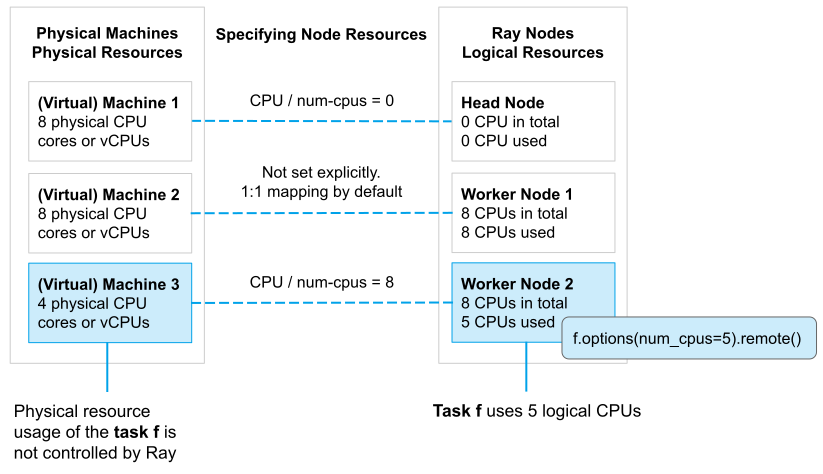
物理资源 vs 逻辑资源
Custom Resources
除了预定义的资源外,您还可以指定 Ray 节点的自定义资源,并在Task或Actor中请求它们。自定义资源的一些用例包括:
- 您的节点具有特殊硬件,您可以将其表示为自定义资源。然后,您的Task或Actor可以通过
@ray.remote(resources={"special_hardware": 1})请求自定义资源, Ray 将把Task或Actor调度到具有该自定义资源的节点。 - 你可以使用自定义资源作为标签来标记节点,并且可以实现基于标签的亲和调度。例如,你可以通过
ray.remote(resources={"custom_label": 0.001})将Task或Actor调度到具有custom_label自定义资源的节点上。对于这种情况,实际数量并不重要,惯例是指定一个极小的数字,以确保标签资源不会成为并行性的限制因素。
Specifying Node Resources
默认情况下,Ray 节点启动时会预定义 CPU、GPU 和内存资源。每个节点上的这些逻辑资源的数量设置为 Ray 自动检测到的物理数量。默认情况下,逻辑资源按以下规则配置。
警告
Ray 不允许在节点上启动Ray后动态更新资源容量。
- 逻辑CPU数量 (
num_cpus): 设置为机器/容器的CPU数量。 - 逻辑GPU数量 (
num_gpus):设置为机器/容器的GPU数量。 - 内存 (
memory):当 ray 运行时启动时,设置为“可用内存”的 70%。 - 对象存储内存 (
object_store_memory):当 ray 运行时启动时,设置为“可用内存”的 30%。请注意,对象存储内存不是逻辑资源,用户不能将其用于调度。
然而,您总是可以通过手动指定预定义资源的数量并添加自定义资源来覆盖它。根据您启动Ray集群的方式,有几种方法可以做到这一点:
如果你使用 ray.init() 来启动一个单节点 Ray 集群,你可以按照以下方式手动指定节点资源:
# This will start a Ray node with 3 logical cpus, 4 logical gpus,
# 1 special_hardware resource and 1 custom_label resource.
ray.init(num_cpus=3, num_gpus=4, resources={"special_hardware": 1, "custom_label": 1}如果你使用 ray start 来启动一个 Ray 节点,你可以运行:
ray start --head --num-cpus=3 --num-gpus=4 --resources='{"special_hardware": 1, "custom_label": 1}'如果你使用 ray up 来启动一个 Ray 集群,你可以在 yaml 文件中设置 resources 字段:
available_node_types:
  head:
    ...
    resources:
      CPU: 3
      GPU: 4
      special_hardware: 1
custom_label: 1如果你使用 KubeRay 来启动一个 Ray 集群,你可以在 yaml 文件中设置 rayStartParams 字段:
headGroupSpec:
  rayStartParams:
    num-cpus: "3"
    num-gpus: "4"
resources: '"{\"special_hardware\": 1, \"custom_label\": 1}"'指定Task或Actor资源需求
Ray 允许指定Task或Actor的逻辑资源需求(例如,CPU、GPU 和自定义资源)。Task或Actor只有在节点上有足够的所需逻辑资源可用时才会运行。
默认情况下,Ray Task 使用 1 个逻辑 CPU 资源进行调度,Ray Actor使用 1 个逻辑 CPU 进行调度,运行时使用 0 个逻辑 CPU。(这意味着,默认情况下,Actor不能在零 CPU 节点上调度,但可以在任何非零 CPU 节点上运行无限数量的Actor。Actor的默认资源需求是出于历史原因选择的。建议始终为Actor显式设置 num_cpus 以避免任何意外。如果资源被显式指定,它们在调度和执行时都是必需的。)
你也可以明确指定Task或Actor的逻辑资源需求(例如,一个Task可能需要GPU),而不是通过 ray.remote() 和 task.options()/actor.options() 使用默认的资源。
# Specify the default resource requirements for this remote function.
@ray.remote(num_cpus=2, num_gpus=2, resources={"special_hardware": 1})
def func():
    return 1


# You can override the default resource requirements.
func.options(num_cpus=3, num_gpus=1, resources={"special_hardware": 0}).remote()


@ray.remote(num_cpus=0, num_gpus=1)
class Actor:
    pass


# You can override the default resource requirements for actors as well.
actor = Actor.options(num_cpus=1, num_gpus=0).remote()Task和 Actors资源需求对 Ray 的调度并发性有影响。特别是,在给定节点上所有并发执行的Task和actors的逻辑资源需求总和不能超过该节点的总逻辑资源。这一特性可以用来 限制并发运行的Task或actors的数量,以避免诸如 OOM 等问题。
分数资源需求
Ray 支持分数资源需求。例如,如果你的Task或Actor是IO绑定的且CPU使用率低,你可以指定分数CPU num_cpus=0.5 甚至零CPU num_cpus=0。分数资源需求的精度为0.0001,因此你应该避免指定超出该精度的双精度数。
@ray.remote(num_cpus=0.5)
def io_bound_task():
    import time

    time.sleep(1)
    return 2


io_bound_task.remote()


@ray.remote(num_gpus=0.5)
class IOActor:
    def ping(self):
        import os

        print(f"CUDA_VISIBLE_DEVICES: {os.environ['CUDA_VISIBLE_DEVICES']}")


# Two actors can share the same GPU.
io_actor1 = IOActor.remote()
io_actor2 = IOActor.remote()
ray.get(io_actor1.ping.remote())
ray.get(io_actor2.ping.remote())
# Output:
# (IOActor pid=96328) CUDA_VISIBLE_DEVICES: 1
# (IOActor pid=96329) CUDA_VISIBLE_DEVICES: 1备注: GPU、TPU 和 neuron_cores 资源需求大于 1 ,需要是整数。例如,
num_gpus=1.5是无效的。
小技巧
除了资源需求,您还可以为Task或Actor指定运行环境,这可以包括Python包、本地文件、环境变量等。详情请参阅 运行时环境。
Placement groups
Placement group允许用户在多个节点上原子性地保留一组资源(即,成组调度)。然后,它们可以用于为局部性(PACK)或分散(SPREAD)调度Ray Task和Actor。Placement group 通常用于成组调度Actor,但也支持Task。
以下是一些实际应用案例:
- 分布式机器学习训练:分布式训练(例如,Ray Train 和 Ray Tune)使用 placement group API来实现群体调度。在这些设置中,一个试验的所有资源必须同时可用。群体调度是实现深度学习训练 all-or-nothing 调度的关键技术。
- 分布式训练中的容错:Placement groups 可以用于配置容错。在 Ray Tune 中,将单个试验的相关资源打包在一起可能是有益的,这样节点故障只会影响少量试验。在支持弹性训练的库(例如,XGBoost-Ray)中,将资源分散到多个节点可以帮助确保即使某个节点失效,训练也能继续进行。
Key Concepts
Bundles
一个 bundle 是“资源”的集合。它可以是单一资源,如 {"CPU": 1},或一组资源,如 {"CPU": 1, "GPU": 4}。bundle 是用于Placement group的预留单元。“调度一个 bundle” 意味着我们找到一个适合该 bundle 的节点,并预留 bundle 指定的资源。一个 bundle 必须能够适应 Ray 集群中的单个节点。例如,如果你只有一个 8 CPU 的节点,而你有一个需要 {"CPU": 9} 的 bundle,这个 bundle 就无法被调度。
Placement group
Placement group 从集群中预留资源。预留的资源只能被使用 PlacementGroupSchedulingStrategy 的Task或Actor使用。
- Placement group由一组bundles表示。例如,
{"CPU": 1} * 4表示您希望保留 4 个包含 1 个 CPU 的bundles(即,它保留了 4 个 CPU)。 - 然后,根据集群节点上的 placement strategies 放置bundles。
- 创建 placement group 后,Task或Actor可以根据 placement group甚至单个bundles进行调度。
创建Placement group(预留资源)
你可以使用 ray.util.placement_group() 创建一个Placement group。Placement group接收一个bundles列表和一个 placement strategy 。请注意,每个bundle 必须能够适应Ray集群中的单个节点。例如,如果你只有一个8 CPU的节点,并且你有一个需要 {"CPU": 9} 的bundles,这个bundles将无法被调度。
bundles 通过字典列表指定,例如 [{'CPU': 1}, {'CPU': 1, 'GPU': 1}])。
CPU对应于在ray.remote中使用的num_cpus。GPU对应于在ray.remote中使用的num_gpus。memory对应于在ray.remote中使用的memory- 其他资源对应于
ray.remote中使用的resources(例如,ray.init(resources={"disk": 1})可以有一个{"disk": 1}的 bundle )。
Placement group 调度是异步的。ray.util.placement_group 会立即返回。
from pprint import pprint
import time

# Import Placement group APIs.
from ray.util.placement_group import (
    placement_group,
    placement_group_table,
    remove_placement_group,
)
from ray.util.scheduling_strategies import PlacementGroupSchedulingStrategy

# Initialize Ray.
import ray

# Create a single node Ray cluster with 2 CPUs and 2 GPUs.
ray.init(num_cpus=2, num_gpus=2)

# Reserve a Placement group of 1 bundle that reserves 1 CPU and 1 GPU.
pg = placement_group([{"CPU": 1, "GPU": 1}])你可以使用以下两种API之一来阻塞你的程序,直到Placement group准备就绪:
# Wait until Placement group is created.
ray.get(pg.ready(), timeout=10)

# You can also use ray.wait.
ready, unready = ray.wait([pg.ready()], timeout=10)

# You can look at Placement group states using this API.
print(placement_group_table(pg))让我们验证Placement group是否成功创建。
# This API is only available when you download Ray via `pip install "ray[default]"`
ray list placement-groups======== List: 2023-04-07 01:15:05.682519 ========
Stats:
------------------------------
Total: 1
Table:
------------------------------
PLACEMENT_GROUP_ID NAME CREATOR_JOB_ID STATE
0 3cd6174711f47c14132155039c0501000000 01000000 CREATEDPlacement group已成功创建。在 {"CPU": 2, "GPU": 2} 资源中,Placement group预留了 {"CPU": 1, "GPU": 1}。预留的资源只能在您使用Placement group调度Task或Actor时使用。下图展示了Placement group预留的“1 CPU 和 1 GPU”bundles。
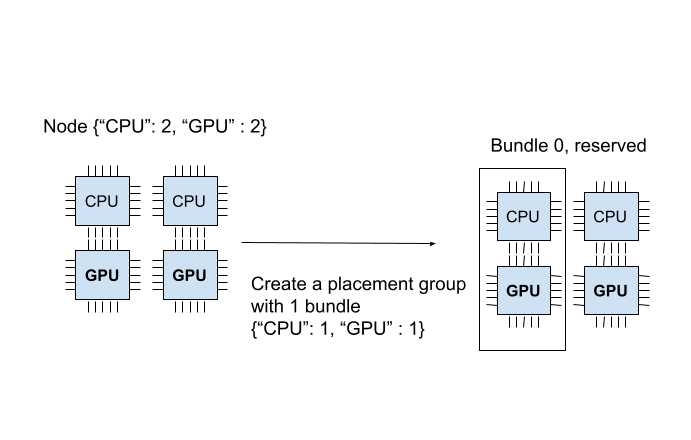
Placement group是原子性创建的;如果一个bundle 无法适应当前任何节点,整个Placement group将未就绪,并且不会保留任何资源。为了说明,让我们创建另一个需 {“CPU”:1}, {“GPU”: 2}(2个bundles)的Placement group。
# Cannot create this Placement group because we
# cannot create a {"GPU": 2} bundle.
pending_pg = placement_group([{"CPU": 1}, {"GPU": 2}])
# This raises the timeout exception!
try:
    ray.get(pending_pg.ready(), timeout=5)
except Exception as e:
    print(
        "Cannot create a Placement group because "
        "{'GPU': 2} bundle cannot be created."
    )
print(e)您可以验证新的Placement group是否处于待创建状态。
# This API is only available when you download Ray via `pip install "ray[default]"`
ray list placement-groups======== List: 2023-04-07 01:16:23.733410 ========
Stats:
------------------------------
Total: 2
Table:
------------------------------
PLACEMENT_GROUP_ID NAME CREATOR_JOB_ID STATE
0 3cd6174711f47c14132155039c0501000000 01000000 CREATED
1 e1b043bebc751c3081bddc24834d01000000 01000000 PENDING <---- the new Placement group.你也可以使用 ray status CLI 命令来验证 {"CPU": 1, "GPU": 2} bundles无法被分配。
ray statusResources
---------------------------------------------------------------
Usage:
0.0/2.0 CPU (0.0 used of 1.0 reserved in Placement groups)
0.0/2.0 GPU (0.0 used of 1.0 reserved in Placement groups)
0B/3.46GiB memory
0B/1.73GiB object_store_memory
Demands:
{'CPU': 1.0} * 1, {'GPU': 2.0} * 1 (PACK): 1+ pending Placement groups <--- 1 Placement group is pending creation.当前集群有 {"CPU": 2, "GPU": 2}。我们已经创建了一个 {"CPU": 1, "GPU": 1} 的bundles,因此集群中只剩下 {"CPU": 1, "GPU": 1}。如果我们创建两个bundles {"CPU": 1}, {"GPU": 2},我们可以成功创建第一个bundle,但无法调度第二个bundle。由于我们无法在集群上创建每个bundle,因此不会创建Placement group,包括 {"CPU": 1} bundles。
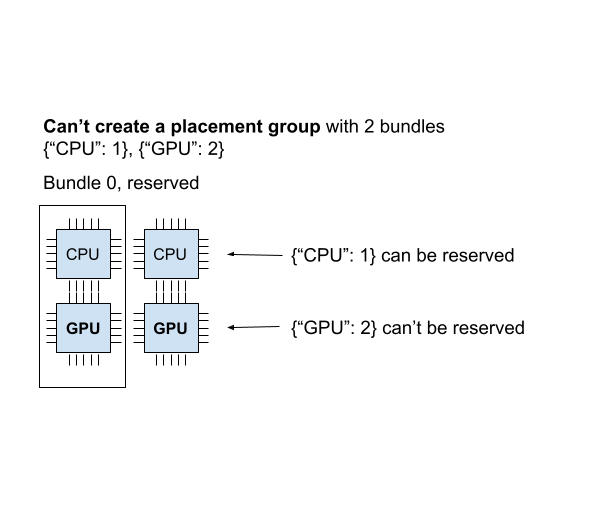
当无法以任何方式调度Placement group时,它被称为“不可行”。想象一下,你调度了 {"CPU": 4} 的bundles,但你只有一个拥有2个CPU的节点。在你的集群中无法创建这个bundle。Ray Autoscaler 知道Placement group,并自动扩展集群以确保待处理的组可以根据需要放置。
如果 Ray Autoscaler 无法提供资源来调度一个Placement group,Ray 不会打印关于不可行组和使用这些组的Task和Actor的警告。你可以从 仪表板或状态API 观察Placement group的调度状态。
将Task和Actors调度到Placement group(使用预留资源)
在上一节中,我们创建了一个保留了 {"CPU": 1, "GPU: 1"} 的Placement group,该Placement group来自一个拥有2个CPU和2个GPU的节点。
现在让我们将一个actors调度到Placement group。你可以使用 options(scheduling_strategy=PlacementGroupSchedulingStrategy(...)) 将Actors或Task调度到Placement group。
@ray.remote(num_cpus=1)
class Actor:
    def __init__(self):
        pass

    def ready(self):
        pass


# Create an actor to a Placement group.
actor = Actor.options(
    scheduling_strategy=PlacementGroupSchedulingStrategy(
        placement_group=pg,
    )
).remote()

# Verify the actor is scheduled.
ray.get(actor.ready.remote(), timeout=10)备注
默认情况下,Ray Actor在调度时需要 1 个逻辑 CPU,但在调度后,它们不会获取任何 CPU 资源。换句话说,默认情况下,Actor不能在零 CPU 节点上调度,但无限数量的Actor可以在任何非零 CPU 节点上运行。因此,当使用默认资源要求和Placement group调度Actor时,Placement group必须创建包含至少 1 个 CPU 的bundles(因为Actor需要 1 个 CPU 进行调度)。然而,Actor创建后,它不会消耗任何Placement group资源。
为了避免任何意外,始终为Actor明确指定资源需求。如果资源被明确指定,它们在调度时间和执行时间都是必需的。
Actor 现在已调度!一个bundle 可以被多个Task和 Actor使用(即,bundles与Task(或Actor)之间是一对多的关系)。在这种情况下,由于actor使用了1个CPU,bundles中还剩下1个GPU。你可以通过CLI命令ray status来验证这一点。你可以看到1个CPU被Placement group 保留,并且1.0 被使用(由我们创建的actor使用)。
ray statusResources
---------------------------------------------------------------
Usage:
1.0/2.0 CPU (1.0 used of 1.0 reserved in Placement groups) <---
0.0/2.0 GPU (0.0 used of 1.0 reserved in Placement groups)
0B/4.29GiB memory
0B/2.00GiB object_store_memory
Demands:
(no resource demands)你也可以使用 ray list actors 来验证Actor是否已创建。
# This API is only available when you download Ray via `pip install "ray[default]"`
ray list actors --detail- actor_id: b5c990f135a7b32bfbb05e1701000000
class_name: Actor
death_cause: null
is_detached: false
job_id: '01000000'
name: ''
node_id: b552ca3009081c9de857a31e529d248ba051a4d3aeece7135dde8427
pid: 8795
placement_group_id: d2e660ac256db230dbe516127c4a01000000 <------
ray_namespace: e5b19111-306c-4cd8-9e4f-4b13d42dff86
repr_name: ''
required_resources:
CPU_group_d2e660ac256db230dbe516127c4a01000000: 1.0
serialized_runtime_env: '{}'
state: ALIVE由于还剩下1个GPU,让我们创建一个需要1个GPU的新actor。这次,我们还指定了placement_group_bundle_index。每个bundle在Placement group中都有一个“索引”。例如,一个包含2个bundle的Placement group [{"CPU": 1}, {"GPU": 1}] 有索引0的bundle {"CPU": 1} 和索引1的bundle {"GPU": 1}。由于我们只有一个bundle,所以我们只有索引0。如果你不指定bundle,Actor(或Task)会被调度到一个具有未分配保留资源的随机bundle上。
@ray.remote(num_cpus=0, num_gpus=1)
class Actor:
    def __init__(self):
        pass

    def ready(self):
        pass


# Create a GPU actor on the first bundle of index 0.
actor2 = Actor.options(
    scheduling_strategy=PlacementGroupSchedulingStrategy(
        placement_group=pg,
        placement_group_bundle_index=0,
    )
).remote()

# Verify that the GPU actor is scheduled.
ray.get(actor2.ready.remote(), timeout=10)我们成功调度了GPU actor!下面的图像描述了两个actors被调度到Placement group中。
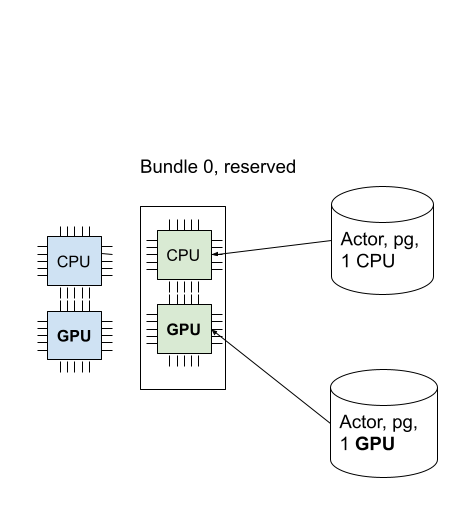
你也可以通过 ray status 命令来验证所有预留的资源是否都被使用。
ray statusResources
---------------------------------------------------------------
Usage:
1.0/2.0 CPU (1.0 used of 1.0 reserved in Placement groups)
1.0/2.0 GPU (1.0 used of 1.0 reserved in Placement groups) <----
0B/4.29GiB memory
0B/2.00GiB object_store_memoryPlacement Strategy
Placement group 提供的功能之一是在 bundles 之间添加放置约束。
例如,您可能希望将您的 bundles 打包到同一个节点,或者尽可能分散到多个节点。您可以通过 strategy 参数指定策略。这样,您可以确保您的Actors和Task可以根据某些放置约束进行调度。
下面的示例创建了一个包含2个 bundles 的Placement group,使用PACK策略;这两个 bundles 必须创建在同一个节点上。请注意,这是一个软策略。如果 bundles 不能被打包到一个节点中,它们将被分散到其他节点。如果你想避免这个问题,可以使用STRICT_PACK策略,如果放置要求不能满足,则无法创建Placement group。
# Reserve a Placement group of 2 bundles
# that have to be packed on the same node.
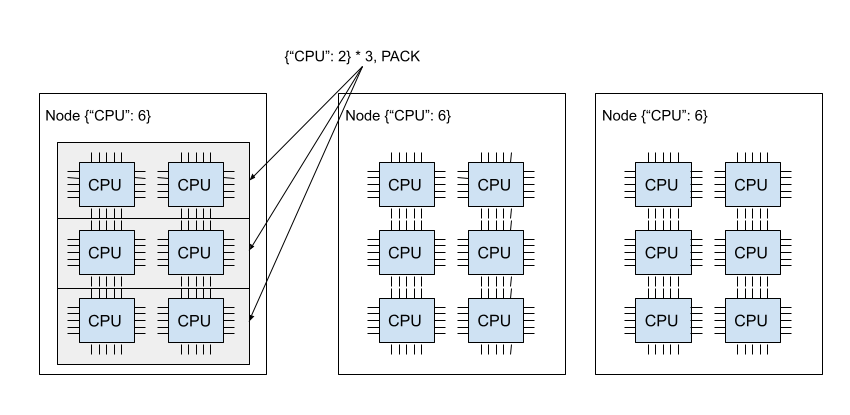
pg = placement_group([{"CPU": 1}, {"GPU": 1}], strategy="PACK")下图展示了 PACK 策略。三个 {"CPU": 2} bundles位于同一个节点中。
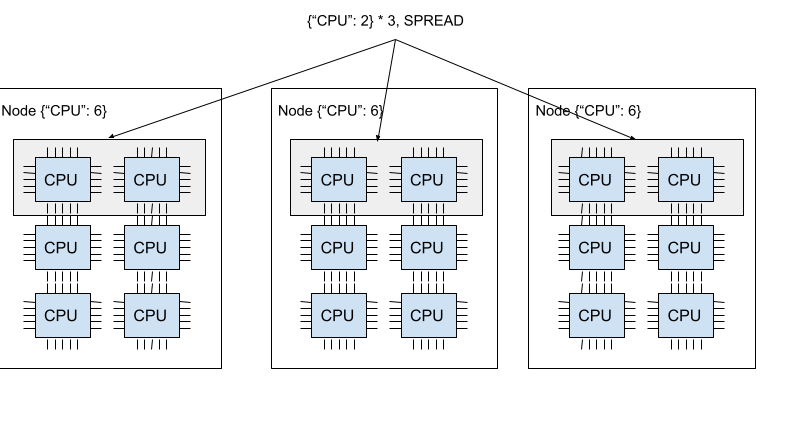
下图展示了SPREAD策略。三个 {"CPU": 2} 的bundles分别位于三个不同的节点上。
Ray 支持四种Placement group策略。默认的调度策略是 PACK。
STRICT_PACK
所有bundles必须放置在集群的单个节点上。当你想要最大化局部性时,请使用此策略。
PACK
所有提供的 bundles 都是基于尽力而为的原则打包到一个节点上。如果严格打包不可行(即,某些 bundles 不适合该节点),可以将 bundles 放置到其他节点上。
STRICT_SPREAD
每个 bundle 必须在单独的节点上调度。
SPREAD
每个bundles都会尽力分散到不同的节点上。如果严格分散不可行,bundles 可以放置在重叠的节点上。
移除Placement group(释放预留资源)
默认情况下,Placement group 的生存期与创建它的驱动程序的作用域相同(除非你将其设为 分离的Placement group)。当从 分离的actor 创建Placement group时,生存期与分离的actor的作用域相同。在 Ray 中,驱动程序是调用 ray.init 的 Python 脚本。
从Placement group中保留的资源(bundles)在创建Placement group的驱动程序或分离的actors退出时会自动释放。要手动释放保留的资源,请使用 remove_placement_group API 删除Placement group(这也是一个异步API)。
备注
当你移除 Placement group 时,仍然使用保留资源的Actor或Task将被强制终止。
# This API is asynchronous.
remove_placement_group(pg)

# Wait until Placement group is killed.
time.sleep(1)
# Check that the Placement group has died.
pprint(placement_group_table(pg))

"""
{'bundles': {0: {'GPU': 1.0}, 1: {'CPU': 1.0}},
'name': 'unnamed_group',
'placement_group_id': '40816b6ad474a6942b0edb45809b39c3',
'state': 'REMOVED',
'strategy': 'PACK'}
"""观察和调试Placement group
Ray 提供了几种有用的工具来检查Placement group状态和资源使用情况。
- Ray Status 是一个用于查看Placement group资源使用情况和调度资源需求的CLI工具。
- Ray Dashboard 是一个用于检查Placement group状态的UI工具。
- Ray State API 是一个用于检查Placement group状态的CLI。
ray 状态 (CLI)
CLI 命令 ray status 提供了集群的自动扩展状态。它提供了未调度Placement group的“资源需求”以及资源预留状态。
Resources
---------------------------------------------------------------
Usage:
1.0/2.0 CPU (1.0 used of 1.0 reserved in Placement groups)
0.0/2.0 GPU (0.0 used of 1.0 reserved in Placement groups)
0B/4.29GiB memory
0B/2.00GiB object_store_memory仪表盘
The dashboard job view 提供了放置组表,显示了放置组的调度状态和元数据。
Ray State API
Ray 状态 API 是一个用于检查 Ray 资源(任务、角色、放置组等)状态的 CLI 工具。
ray list placement-groups 提供了放置组的元数据和调度状态。ray list placement-groups --detail 提供了更详细的统计信息和调度状态。
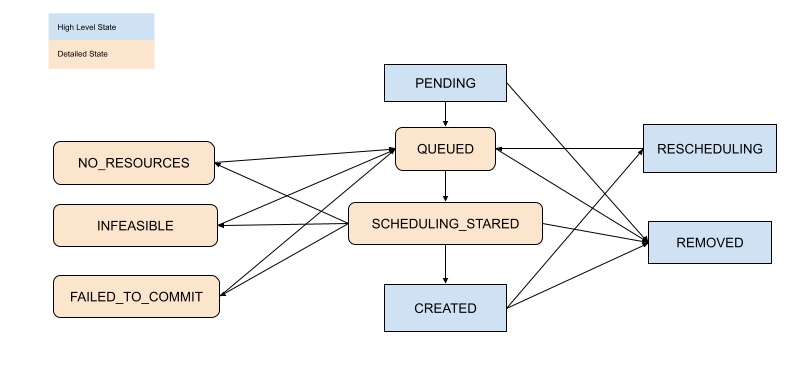
检查Placement group调度状态
使用上述工具,您可以查看Placement group的状态。状态的定义在以下文件中指定:
[高级] Child Task 和 Actor
默认情况下,Child actor和Task不共享父Actor使用的相同Placement group。要自动将Child actor或Task调度到相同的Placement group,请将 placement_group_capture_child_tasks 设置为 True。
import ray
from ray.util.placement_group import placement_group
from ray.util.scheduling_strategies import PlacementGroupSchedulingStrategy

ray.init(num_cpus=2)

# Create a Placement group.
pg = placement_group([{"CPU": 2}])
ray.get(pg.ready())


@ray.remote(num_cpus=1)
def child():
    import time

    time.sleep(5)


@ray.remote(num_cpus=1)
def parent():
    # The child task is scheduled to the same Placement group as its parent,
    # although it didn't specify the PlacementGroupSchedulingStrategy.
    ray.get(child.remote())


# Since the child and parent use 1 CPU each, the Placement group
# bundle {"CPU": 2} is fully occupied.
ray.get(
    parent.options(
        scheduling_strategy=PlacementGroupSchedulingStrategy(
            placement_group=pg, placement_group_capture_child_tasks=True
        )
    ).remote()
)当 placement_group_capture_child_tasks 为 True 时,但你不希望将Child Task和Actor 调度到同一个Placement group,请指定 PlacementGroupSchedulingStrategy(placement_group=None)。
@ray.remote
def parent():
    # In this case, the child task isn't
    # scheduled with the parent's Placement group.
    ray.get(
        child.options(
            scheduling_strategy=PlacementGroupSchedulingStrategy(placement_group=None)
        ).remote()
    )


# This times out because we cannot schedule the child task.
# The cluster has {"CPU": 2}, and both of them are reserved by
# the Placement group with a bundle {"CPU": 2}. Since the child shouldn't
# be scheduled within this Placement group, it cannot be scheduled because
# there's no available CPU resources.
try:
    ray.get(
        parent.options(
            scheduling_strategy=PlacementGroupSchedulingStrategy(
                placement_group=pg, placement_group_capture_child_tasks=True
            )
        ).remote(),
        timeout=5,
    )
except Exception as e:
    print("Couldn't create a child task!")
print(e)警告:
对于给定的actor,
placement_group_capture_child_tasks的值不会从其父actor继承。如果你正在创建深度大于1的嵌套actor,并且所有actor都应该使用相同的Placement group,你应该为每个actor显式设置placement_group_capture_child_tasks。
[高级] 命名Placement group
一个Placement group可以被赋予一个全局唯一的名称。这允许你从Ray集群中的任何作业中检索Placement group。如果你无法直接将Placement group句柄传递给需要它的actor或Task,或者如果你试图访问由另一个驱动程序启动的Placement group,这会很有用。请注意,如果Placement group的生存期不是detached,它仍然会被销毁。
# first_driver.py
# Create a Placement group with a global name.
pg = placement_group([{"CPU": 1}], name="global_name")
ray.get(pg.ready())

# second_driver.py
# Retrieve a Placement group with a global name.
pg = ray.util.get_placement_group("global_name")[高级] 分离Placement group
默认情况下,Placement group的生存期属于驱动程序和执行程序。
- 如果Placement group是从驱动程序创建的,那么当驱动程序终止时,它也会被销毁。
- 如果它是由一个分离的actor创建的,当分离的actor被杀死时,它也会被杀死。
要保持Placement group在任何作业或分离的actors中存活,请指定 lifetime="detached"。例如:
# driver_1.py
# Create a detached Placement group that survives even after
# the job terminates.
pg = placement_group([{"CPU": 1}], lifetime="detached", name="global_name")
ray.get(pg.ready())让我们终止当前的脚本并启动一个新的 Python 脚本。调用 ray list placement-groups,你可以看到Placement group没有被移除。
请注意,生命周期选项与名称是分离的。如果我们只指定了名称而没有指定 lifetime="detached",那么Placement group只能在原始驱动程序仍在运行时才能被检索。建议在创建分离的Placement group时始终指定名称。
[高级] 容错
在死节点上重新调度bundles
如果包含某个Placement group中的一些束的节点死亡,GCS(即我们尝试再次保留资源)会将所有束重新调度到不同的节点上。这意味着Placement group的初始创建是“原子的”,但一旦创建,就可能存在部分Placement group。重新调度束的调度优先级高于其他Placement group调度。
为部分丢失的bundles提供资源
如果没有足够的资源来调度部分丢失的bundles,Placement group将等待,假设 Ray Autoscaler 会启动一个新节点以满足资源需求。如果无法提供额外的资源(例如,您不使用 Autoscaler 或 Autoscaler 达到资源限制),Placement group将无限期地保持部分创建状态。
使用bundles的actors和Task的容错性
使用bundles(保留资源)的actors和Task在bundles恢复后,会根据其 容错策略 重新调度。